Watch the 2-minute setup
LT Crumbly is a block theme for bakeries, patisseries and cake shops. See it live in the demo.
Section patterns (Pro)
| Pattern | Use it for |
|---|---|
| Hero with order a cake card | Light hero with headline, buttons and highlights, next to an arched cake photo with cake sizes, servings, example prices, flavours, the order lead time and an Order a cake button. |
| What we bake | Eight cards with icons: breads, viennoiserie, cakes and tarts, celebration cakes, cookies, savoury bakes, coffee and wholesale. |
| Pre-order banner | Raspberry strip inviting customers to pre-order bread and pastries, with a call button. |
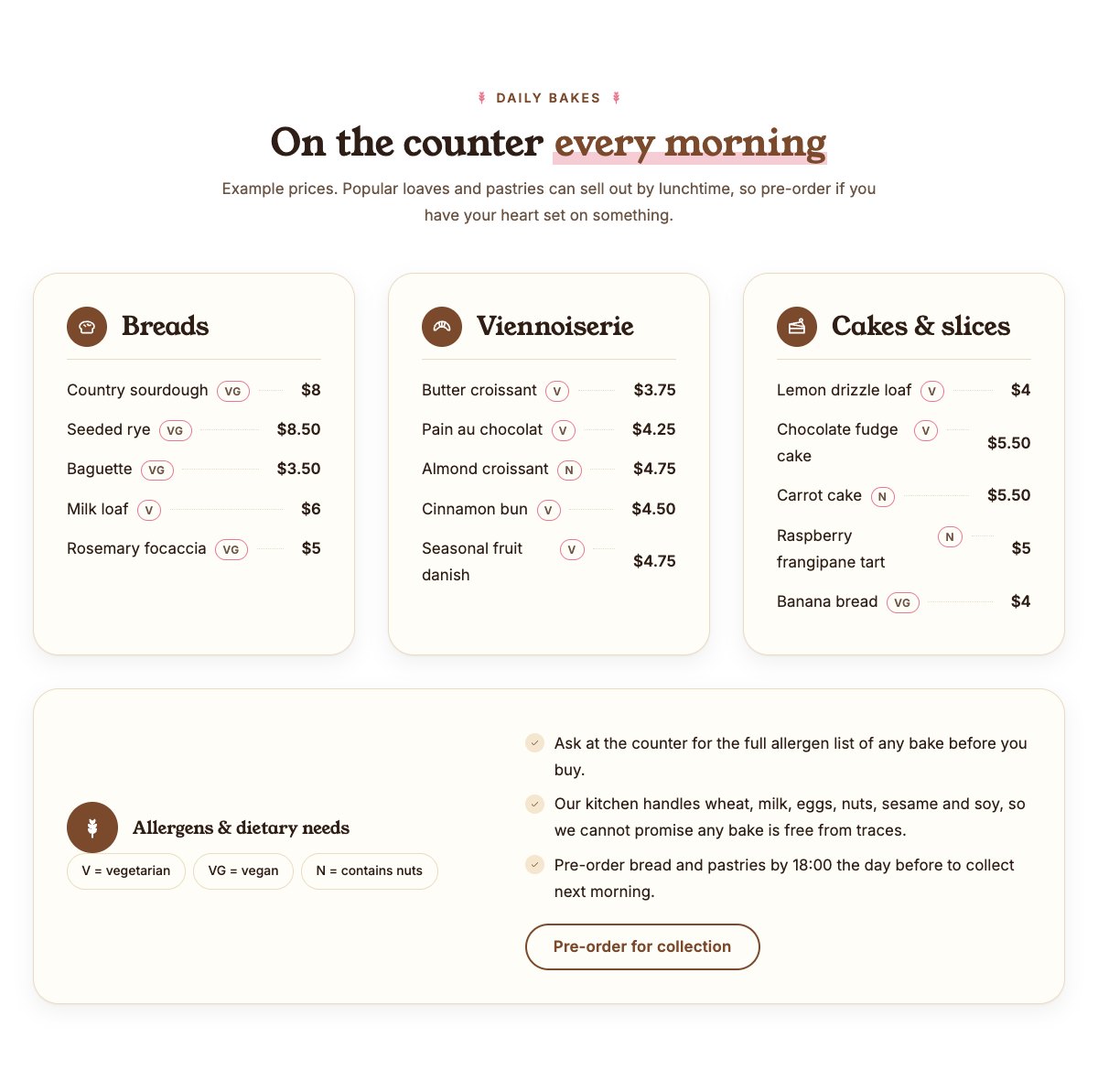
| Daily bakes menu | Breads, viennoiserie and cakes with V, VG and N tags, dotted leaders and example prices, then the dietary key, the allergen note and the pre-order cut-off. |
| Fresh from the oven | Dark band with four sample oven times. |
| Our story | Arched bakery photo, the story and a checklist. |
| Celebration cakes | Four ordering steps (size and flavour, design, confirm, collect or delivery) with order and gallery buttons. |
| Custom cake gallery | Six portrait photos of your cakes with captions and an Instagram link. |
| Wholesale for cafés | Dark cocoa band with a photo, delivery and order terms, and a wholesale enquiry button. |
| Our bakers | Head baker, pastry chef and cake designer with arched photos and one line each. |
| Customer reviews | Three review cards (use real reviews only). |
| Frequently asked questions | Allergens, cake order lead times, delivery, pre-orders, vegan and gluten-free options, and wholesale. |
| Opening hours and location | Opening hours, address, phone and a map with directions. |
| Contact cards | Call, email and visit cards. |
| Order call to action | Cocoa band with order and phone buttons. |
Page layouts (Pro)
- Home page: the complete homepage.
- Menu page: what we bake, the daily bakes menu, bake times, celebration cakes, the cake gallery, wholesale and FAQ.
- About page: our story, bake times, bakers, reviews and the cake gallery.
- Contact page: contact cards, pre-order banner, opening hours with map and the order band.
Demo content to replace
- Phone
(555) 016-4422, email[email protected]and the Wheatsheaf Lane address (header, footer, contact sections). - Opening hours (top bar, footer, hours section), the sample bake times and the pre-order cut-off (18:00).
- The cake sizes, servings, example prices, flavours and the order lead time in the hero card, and the four cake ordering steps (deposit, delivery).
- Every bake, tag and example price in the daily bakes menu; the allergens your kitchen handles (menu band and FAQ); the wholesale delivery terms.
- Baker names, roles and photos; the six cake gallery photos; sample customer reviews.
- The “Order a cake” buttons: link them to your order form or shop. “More cakes on Instagram”: point it to your own profile.
Keep the allergen note, list only the allergens your kitchen really handles, and only mark a bake vegetarian, vegan or with nuts when you have checked it. Never call a bake gluten-free or allergen-free unless your kitchen can guarantee it. Prices in the demo are examples. Do not add health claims about bread or cakes, or ratings, awards or certifications your bakery does not have.
Photo guide
Replace the illustrations and placeholder portraits with your own photos: select the image in the editor, then Replace. These sizes look sharp on large screens without slowing the site down.
| Image | Shape | Upload size | Tips |
|---|---|---|---|
| Hero cake photo | Portrait 4:5, arched top | 1000 × 1250 px | A whole cake on a stand or a counter of cakes. Keep the cake in the upper middle: the arch trims the top corners and the order card covers the bottom left. |
| Bakery photo (Our story) | Landscape 5:4, arched top | 1600 × 1280 px | Your counter or bread shelves in daylight. |
| Wholesale photo | Landscape 5:4 | 1600 × 1280 px | Loaves cooling on racks, crates or trays ready for delivery. |
| Team photos | Portrait 4:5, arched top | 800 × 1000 px | Head and shoulders with space above the head, same light for everyone. |
| Cake gallery (6 photos) | Portrait 4:5 | 1000 × 1250 px | Celebration cakes you made, with similar light and background so the grid looks calm. |
| Map picture | Landscape 3:2 | 1600 × 1040 px | A screenshot of your map, or keep the illustration; the button links to Google Maps. |
| Blog featured images | Landscape 3:2 | 1600 × 1067 px | Shown on the blog cards and at the top of each post. |
| Logo (header and footer) | Wide or square | At least 200 px tall, PNG with a transparent background or SVG | Shown about 44 px tall. Set it in Appearance → Editor: select the logo block. |
| Site icon | Square | 512 × 512 px | The small icon in browser tabs. Settings → General → Site Icon. |
- Save photos as JPEG or WebP and keep each file under about 300 KB (a free tool such as squoosh.app does this).
- WordPress crops to the shape for you: select the image → Crop in the toolbar to choose which part shows.
- Fill in the Alternative text of each photo (for example “Our reception desk”) for accessibility and Google.
- Only use photos you own or have permission for. Ask clients before you publish photos of them.
Colour styles
Default (cocoa and raspberry), Pistachio, Blackberry and Rye. Try them in the live demo with the colour dots in the top bar.