Watch the 2-minute setup
LT Harvesta is a block theme for farm shops, market gardens and veg box (CSA) schemes. Its look comes from the grower’s year: a 12-month season strip with the current month marked in beet, leaf green for what is in season, and quiet thin rules everywhere else. See it live in the demo.
Section patterns (Pro)
| Pattern | Use it for |
|---|---|
| Hero with this week’s box | A large headline about your picking and delivery days, next to a packing slip with this week’s box, one item marked “new this week”, and the season strip with the current month filled in. |
| How the box works | Four numbered steps across the week: choose a size, we pick on Monday, delivery or collection on Wednesday, skip any week. |
| Box sizes | Your box sizes as rows of a price board: who each box feeds, what is usually in it, the weekly price and a button. |
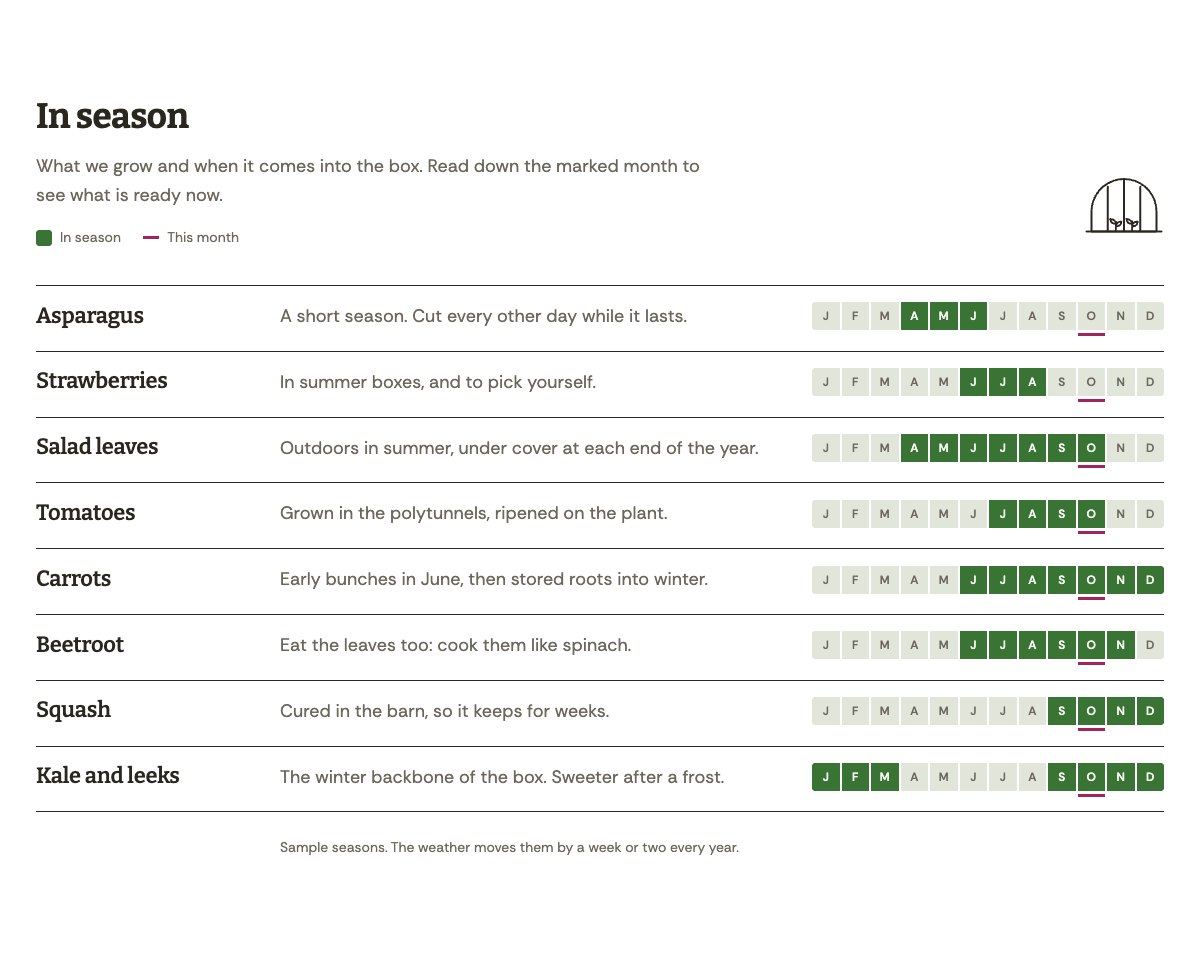
| In season | One row per crop with a short note and its own month strip. Months in season are filled in, and this month is marked down the whole table. |
| Farm shop and opening hours | Photo of the shop, opening hours by day and what is on the shelves. |
| Pick your own | What visitors can pick and when, how it works on the day, and a photo. |
| About the farm | Photo of the farm, its story and a short ticked list. |
| Our growers | Three portraits with what each person looks after and a one-line bio. |
| Open days | The year’s farm events as dated rows, with a tractor drawing. |
| Reviews from box customers | Three sample quotes (use real reviews only). |
| Frequently asked questions | Delivery area, how you grow, skipping weeks, swaps, deliveries when people are out, crates. |
| Location and delivery area | Address and parking, delivery area, phone, and a map with directions. |
| Contact details | Call, email and visit, each under a thin rule. |
| Start a box call to action | Deep green band with the sign-up button and phone. |
| Latest articles | Your three newest blog posts. |
Page layouts (Pro)
- Home page: the complete homepage.
- Veg boxes page: how the box works, box sizes, in season, reviews, FAQ and the call to action.
- About page: the farm’s story, growers, pick your own, reviews, open days and the call to action.
- Contact page: contact details, farm shop hours, FAQ, location with the delivery area and the call to action.
The season strip
Each strip has twelve cells, January to December. The current month is marked automatically, also on pages you saved in an earlier month. Set the months each crop is in season in the In season pattern, or on a page you already created by adding or removing the is-in class on a month in the Code editor. This week’s box list in the hero is normal text: change it whenever the box changes.
Demo content to replace
- Phone
(555) 017-0117, email[email protected]and the Hollow Lane address in Springfield (header, footer, location and contact sections), the directions and parking note. - Farm shop days and hours in the top bar, footer and the farm shop section, and the six items on the shelves.
- This week’s box list and the “Medium box, for two to three people (sample)” label.
- The box sizes and prices marked “Example prices”, the delivery charge, the stopping and skipping rules marked “(example)” and the delivery area marked “(example area)”.
- The crops and months in the In season table (“Sample seasons”) and the pick-your-own months (“Sample months”).
- The open days (“Sample dates”), the farm story (“Sample farm story”), the three sample growers and their photos, and the reviews from “Sample box customer” and “Sample farm shop customer”.
- The FAQ answer to “Is it organic?”, marked “(sample answer)”: write your own.
- The “Start a box” buttons: link them to your sign-up page or online box shop.
Write only what is true for your farm. Do not call your produce organic, pesticide-free or certified unless you hold that certification, and do not make health or nutrition claims about the food. If a box includes anything you did not grow, say so. Publish reviews only from real customers who agreed to it, and do not show children who can be identified in pick-your-own or open day photos without a parent’s permission.
Photo guide
Replace the illustrations and placeholder portraits with your own photos: select the image in the editor, then Replace. These sizes look sharp on large screens without slowing the site down.
| Image | Shape | Upload size | Tips |
|---|---|---|---|
| Farm photo (About) | Landscape 5:4 | 1600 × 1280 px | Your fields or polytunnels, ideally with someone at work. |
| Farm shop photo | Landscape 5:4 | 1600 × 1280 px | The shop inside, with full shelves and crates. |
| Pick your own photo | Landscape 5:4 | 1600 × 1280 px | The picking rows, a full basket or punnets. |
| Grower photos | Portrait 4:5 | 800 × 1000 px | Head and shoulders outdoors, same light for everyone. Ask each person before you publish. |
| Map picture | Landscape 3:2 | 1600 × 1040 px | A screenshot of your map, or keep the illustration; the button links to Google Maps. |
| Blog featured images | Landscape 3:2 | 1600 × 1067 px | Shown on the blog cards and at the top of each post. |
| Logo (header and footer) | Wide or square | At least 200 px tall, PNG with a transparent background or SVG | Shown about 44 px tall. Set it in Appearance → Editor: select the logo block. |
| Site icon | Square | 512 × 512 px | The small icon in browser tabs. Settings → General → Site Icon. |
- Save photos as JPEG or WebP and keep each file under about 300 KB (a free tool such as squoosh.app does this).
- WordPress crops to the shape for you: select the image → Crop in the toolbar to choose which part shows.
- Fill in the Alternative text of each photo (for example “Our reception desk”) for accessibility and Google.
- Only use photos you own or have permission for. Ask clients before you publish photos of them.
Colour styles
Field (default: cool field white, soil, leaf green and a beet mark for this month), Frost (winter blue-grey with a red cabbage mark), Tomato (tomato red with a green calyx mark) and Harvest night (dark, with pale leaf green and pink beet). Try them in the live demo with the colour dots in the top bar.
Box sign-ups
LT Harvesta has no built-in form or checkout. Link the “Start a box” buttons to your box scheme’s sign-up page or online shop, or add your form or shop plugin’s block to the Contact page. Ask only for what you need to deliver the box: name, address, phone or email, box size and start week.