Watch the 2-minute setup
LT Groomly is a block theme for pet groomers, dog grooming salons and mobile groomers. See it live in the demo.
Section patterns (Pro)
| Pattern | Use it for |
|---|---|
| Hero with book-a-groom card | Headline, two buttons, rating line and a booking card with size chips and the next drop-off times. |
| Grooming services | Six service cards with icon tiles: full groom, bath & tidy, nail trim, puppy intro, cat grooming and de-shedding. |
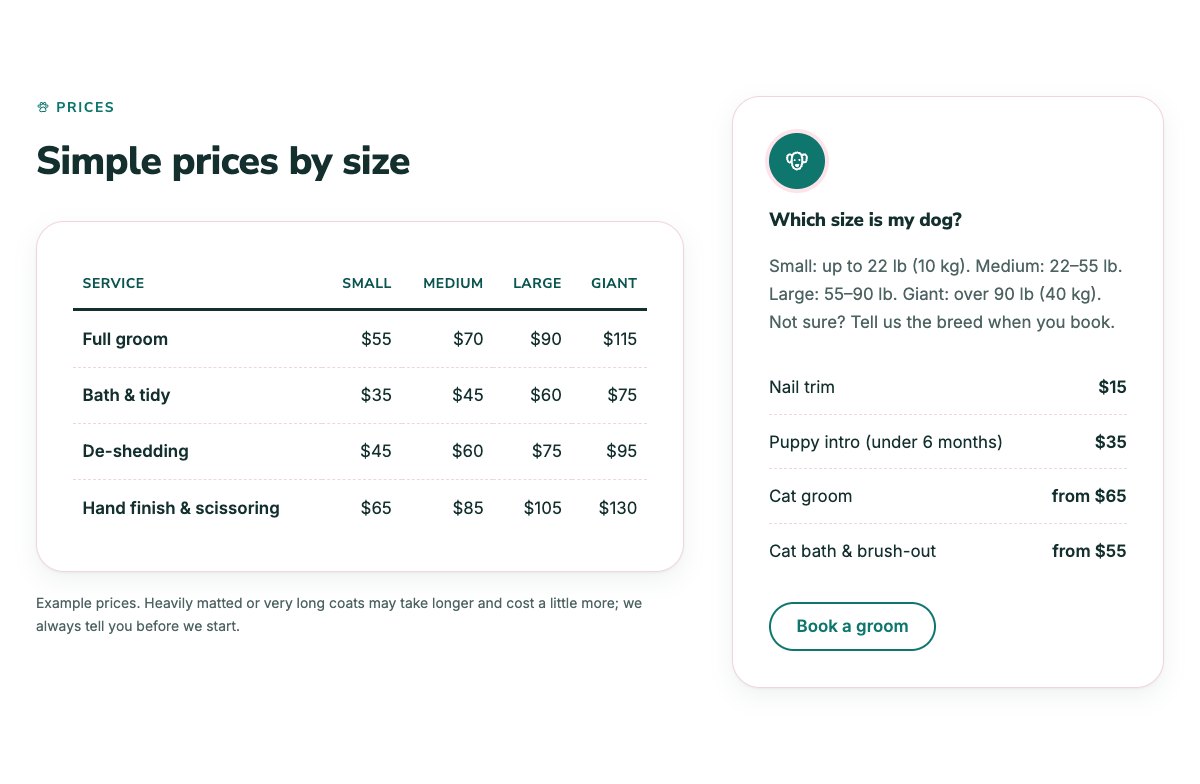
| Prices by size | Price table for small, medium, large and giant dogs, a size guide and flat prices for nails, puppies and cats. |
| Add-ons | Eight small extras with icon, one line and price. |
| What to expect | Four numbered steps from drop-off to pick-up. |
| About the salon | Grooming picture, salon story and a checklist of how you work. |
| Calm care for anxious pets | Four ways you handle nervous pets, with icons. |
| Our groomers | Three team cards with photo, role and bio. |
| Pet gallery | Six square photos of groomed pets with captions and an Instagram link. |
| Pet owner reviews | Three review cards (use real reviews only). |
| Frequently asked questions | Vaccinations, anxious pets, how long a groom takes, how often to groom, matted coats. |
| Opening hours and map | Hours, address, phone and a map with directions. |
| Contact cards | Call, email and visit cards. |
| New client banner | Yellow strip reminding new clients to bring the vaccination record, with a call button. |
| Book a groom call to action | Rounded panel with booking and phone buttons. |
| Latest articles | Your three newest blog posts. |
Page layouts (Pro)
- Home page: the complete homepage.
- Grooming page: services, prices by size, add-ons, calm care, FAQ, new client banner and booking.
- About page: salon story, groomers, pet gallery, reviews and booking.
- Contact page: contact cards, new client banner, and hours with map.
Demo content to replace
- Phone
(555) 016-4928, email[email protected]and the Bramble Street address in Springfield (header, footer, hero, contact sections). - Opening hours (top bar, footer, hours section) and the drop-off times in the hero card.
- The rating line marked “(sample)” in the hero.
- The six services, the example prices by size, the size bands, the flat prices and the eight add-ons.
- Vaccination rules and grooming times in the FAQ and the new client banner.
- Groomer names, roles and photos; the gallery pictures; sample reviews.
- The “Book” buttons: link them to your booking system.
Describe your services plainly and avoid health claims: grooming does not treat skin or ear problems, so send owners to their vet for those. Prices are examples. Only name qualifications your groomers really have, and only show photos of pets whose owners agreed.
Photo guide
Replace the illustrations and placeholder portraits with your own photos: select the image in the editor, then Replace. These sizes look sharp on large screens without slowing the site down.
| Image | Shape | Upload size | Tips |
|---|---|---|---|
| About photo | Landscape 5:4 | 1600 × 1280 px | A groomer working with a relaxed dog on your grooming table. |
| Team photos | Portrait 4:5 | 800 × 1000 px | Head and shoulders, same background and light for everyone. A dog in the picture is a nice touch. |
| Gallery photos | Square 1:1 | 1200 × 1200 px | Freshly groomed dogs and cats, taken in good light against a plain background. |
| Map picture | Landscape 3:2 | 1600 × 1040 px | A screenshot of your map, or keep the illustration; the button links to Google Maps. |
| Blog featured images | Landscape 3:2 | 1600 × 1067 px | Shown on the blog cards and at the top of each post. |
| Logo (header and footer) | Wide or square | At least 200 px tall, PNG with a transparent background or SVG | Shown about 44 px tall. Set it in Appearance → Editor: select the logo block. |
| Site icon | Square | 512 × 512 px | The small icon in browser tabs. Settings → General → Site Icon. |
- Save photos as JPEG or WebP and keep each file under about 300 KB (a free tool such as squoosh.app does this).
- WordPress crops to the shape for you: select the image → Crop in the toolbar to choose which part shows.
- Fill in the Alternative text of each photo (for example “Our reception desk”) for accessibility and Google.
- Only use photos you own or have permission for. Ask clients before you publish photos of them.
Colour styles
Default (teal, soft pink and warm yellow), Bubble Bath (blue), Rosy Nose (pink) and Biscuit (caramel and mint). Try them in the live demo with the colour dots in the top bar.
Booking and forms
LT Groomly has no built-in form. Link the Book buttons to your grooming software’s online booking page, or add a form plugin’s block (WPForms, Fluent Forms, Contact Form 7…) to the Contact page.