Watch the 2-minute setup
LT Swellora is a block theme for surf schools and surf camps: beginner lessons, private coaching, kids’ camps and board and wetsuit hire. Its look comes from a tide table: lessons are planned around the tide, so the day’s lesson times sit on a tide curve, with buoy-orange points for lessons and spaces left. See it live in the demo.
Section patterns (Pro)
| Pattern | Use it for |
|---|---|
| Hero with tide curve and booking card | A wide, heavy headline, two buttons and a Book a lesson card (next lesson, length, kit, price, spaces left). Below, the day’s tide with each lesson time placed on the curve and the low and high tide marked. |
| Lessons list | Beginner group, private lesson, kids’ camp and improvers, each with a line drawing, who it suits, length, group size, price and a booking link. |
| Your first lesson, step by step | Four numbered steps: meet at the hut, safety talk, practice on the sand, into the water, with how long each takes. |
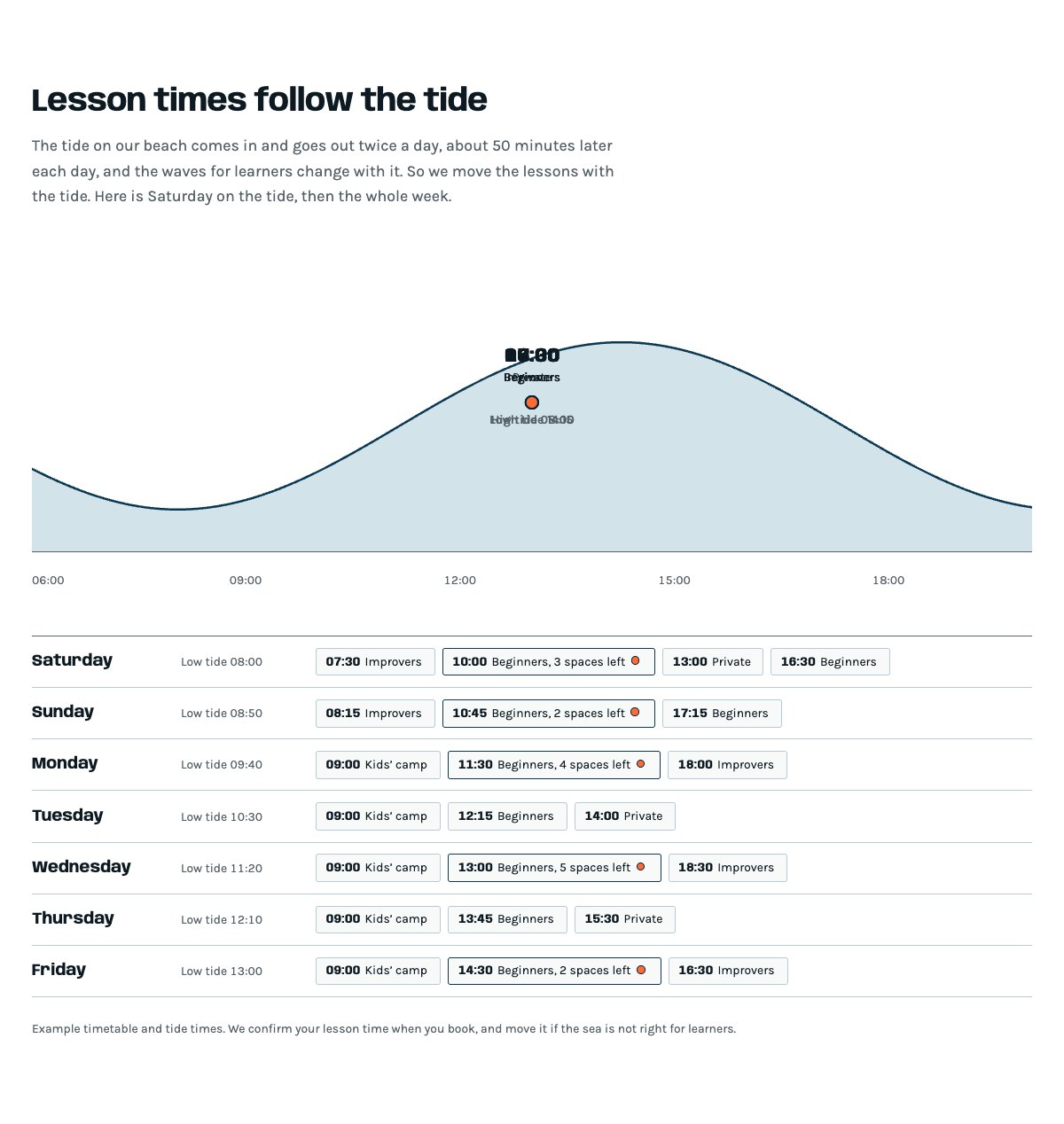
| Lesson times on the tide | One day as a tide curve with its lessons, then the week as rows: day, low tide and lesson times, with an orange point where spaces are left. |
| Surf camps | Kids’ surf camp in the school holidays: ages, weeks, times, group size and price, plus a line for adult weekend camps. |
| Board and wetsuit hire | Hire prices in ruled rows, line drawings and your hire rules. |
| Safety in every lesson | Six notes: instructor qualifications, first aid, conditions checks, group ratio, tide timing, insurance and permits. |
| Instructors | Three portraits with what each one teaches and a one-line bio. |
| Gallery | Four pictures from the beach in an uneven grid. |
| Reviews from learners and parents | Three sample quotes (use real reviews only). |
| Frequently asked questions | Swimming ability, ages, what to bring, waves too big or flat, standing up, family bookings. |
| About the surf school | Picture of a lesson on the sand, your story and a ticked list. |
| Meeting point and hours | Hut hours, the meeting point address, phone and a map with directions. |
| Contact details | Call, email and visit the hut, each under a ruled line. |
| Book a lesson call to action | Deep-water band with booking and phone buttons. |
| Latest articles | Your three newest blog posts. |
Page layouts (Pro)
- Home page: the complete homepage.
- Lessons page: lessons, your first lesson, lesson times on the tide, kids’ camp, hire, FAQ and the booking call to action.
- About page: the school’s story, safety, instructors, gallery, reviews and the call to action.
- Contact page: contact details, FAQ, meeting point with map and the call to action.
Lesson times and the tide curve
The tide curve shows an example day from 06:00 to 20:00. Each lesson on it is a paragraph with a class such as swellora-at-1000 that places it on the line, in 15-minute steps. Change the times and lesson names in the Hero and Lesson times patterns, keeping each class in step with its time. To draw the curve for another day, run python3 tools/tide-curve.py --high 14:15 in the theme folder (Pro Unlimited AI kit), or keep the example day and its “(example day)” wording.
Demo content to replace
- Phone
(555) 017-0122, email[email protected]and the surf hut at 2 Shore Road, North Beach, Springfield (header, footer, meeting point, contact sections), and the parking note. - Hut hours in the footer and the meeting point section.
- The lesson points, tide marks and “(example day)” caption on the tide curve, and the booking card (next lesson, price, spaces left).
- The lessons, lengths, group sizes and prices, marked “Example prices”, and the swimming rule marked “(example rule)”.
- The week of lesson times and low tides, marked “Example timetable”, and every “spaces left”.
- The kids’ camp weeks “(sample dates)”, times, group size and price, and the hire prices and rules.
- The safety details marked “(sample)” or “(example ratio)”: qualifications, first aid, insurance and permit number.
- The three sample instructors, their bios and photos, the gallery pictures and the reviews from “Sample holiday maker”, “Sample parent” and “Sample local surfer”.
- The “Book a lesson” buttons: link them to your booking system.
Write only what is true for your school. Do not add instructor qualifications, lifeguard or first-aid awards, accreditations, insurance or permits you cannot confirm, and never promise that a learner will stand up or surf in a set time. Publish reviews only from real customers who agreed to it. Do not show children who can be identified in photos without a parent’s written permission: people small in the frame, backs and side views work well.
Photo guide
Replace the illustrations and placeholder portraits with your own photos: select the image in the editor, then Replace. These sizes look sharp on large screens without slowing the site down.
| Image | Shape | Upload size | Tips |
|---|---|---|---|
| About photo | Landscape 5:4 | 1600 × 1280 px | A lesson on the sand or in the white water, with people small in the frame. |
| Camp photo | Landscape 4:3 | 1600 × 1200 px | Your camp group in the water or on the beach, seen from behind or far away. |
| Gallery photos | First one square, others landscape 4:3 | 1600 × 1600 px and 1600 × 1200 px | Learners walking to the water, boards on the sand, the waves on your beach, the hut or the hire rail. |
| Instructor photos | Portrait 4:5 | 800 × 1000 px | Head and shoulders on the beach, same light for everyone. Ask each person before you publish. |
| Map picture | Landscape 3:2 | 1600 × 1040 px | A screenshot of your map, or keep the illustration; the button links to Google Maps. |
| Blog featured images | Landscape 3:2 | 1600 × 1067 px | Shown on the blog cards and at the top of each post. |
| Logo (header and footer) | Wide or square | At least 200 px tall, PNG with a transparent background or SVG | Shown about 44 px tall. Set it in Appearance → Editor: select the logo block. |
| Site icon | Square | 512 × 512 px | The small icon in browser tabs. Settings → General → Site Icon. |
- Save photos as JPEG or WebP and keep each file under about 300 KB (a free tool such as squoosh.app does this).
- WordPress crops to the shape for you: select the image → Crop in the toolbar to choose which part shows.
- Fill in the Alternative text of each photo (for example “Our reception desk”) for accessibility and Google.
- Only use photos you own or have permission for. Ask clients before you publish photos of them.
Colour styles
Wax white (default: wax-white paper, deep-water blue, ink and buoy orange), Dawn patrol (dark navy with sky blue), Kelp (sea green with a sand-orange point) and Sunset (deep purple with a pink point). Try them in the live demo with the colour dots in the top bar.
Lesson bookings
LT Swellora has no built-in form. Link the “Book a lesson” buttons to your booking system, or add your form plugin’s block to the Contact page. Ask only for what you need to arrange the lesson: names, ages, how well each person swims, wetsuit sizes and a contact phone number.