Watch the 2-minute setup
LT Pressly is a block theme for dry cleaners, laundries and wash & fold services. See it live in the demo.
Section patterns (Pro)
| Pattern | Use it for |
|---|---|
| Hero with pickup card | Headline, pickup and price buttons, a rating line and a “Schedule a pickup” card with three time windows. |
| Service at a glance | Four short service facts on a tinted band: turnaround, pickup days, free pickup threshold, same-day shirts. |
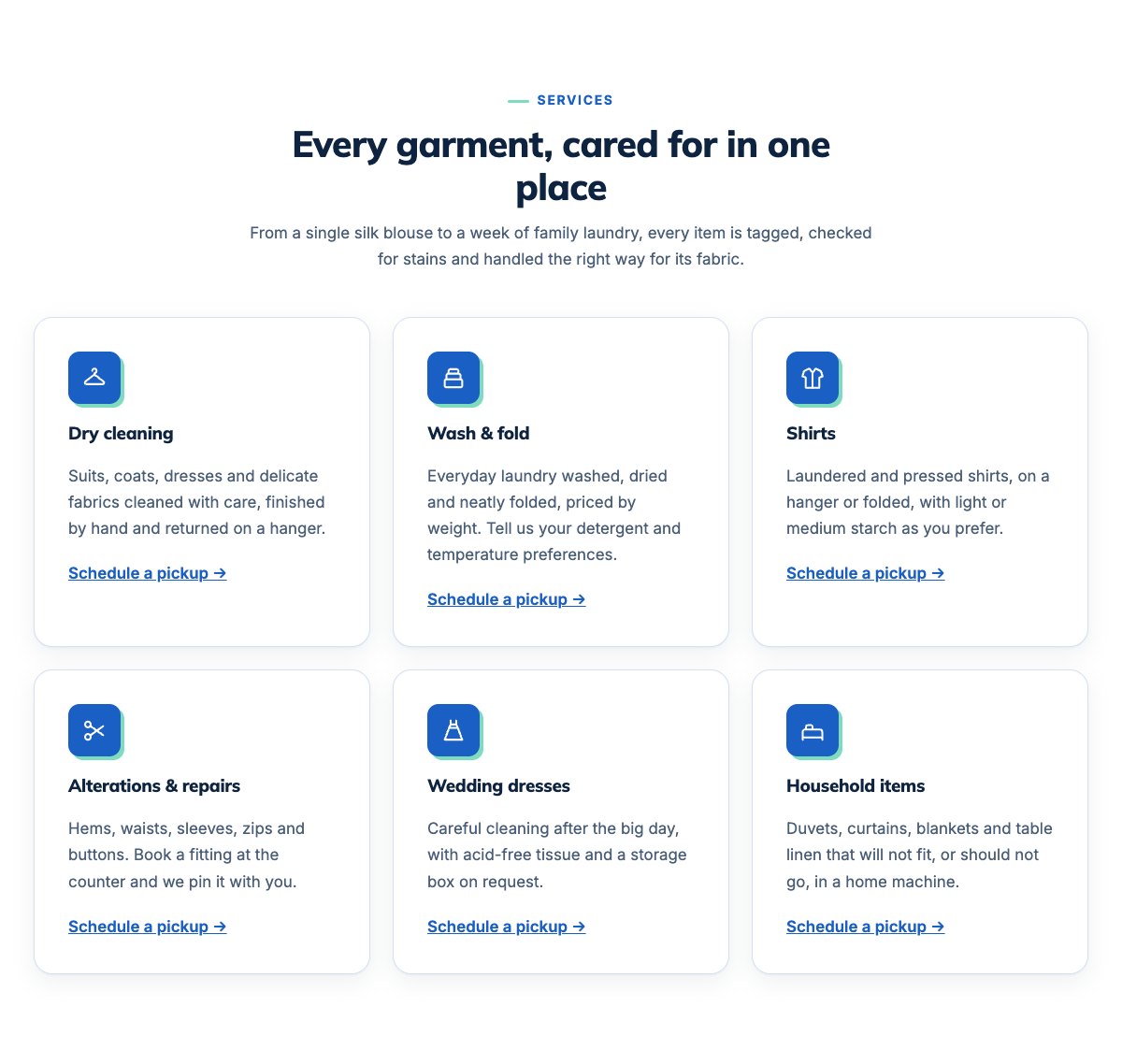
| Cleaning services grid | Six service cards: dry cleaning, wash & fold, shirts, alterations, wedding dresses and household items. |
| Pickup and delivery | Four ticket-numbered steps from booking a time window to clean clothes back at the door. |
| Price list | Example per-item prices next to pickup, express and payment details. |
| Eco-friendly process | Four points about how you clean (sample text: keep only what is true for your shop). |
| About the cleaners | Illustration, shop story and a checklist of what every order gets. |
| Our team | Staff cards with photo, role and bio. |
| Customer reviews | Three review cards (use real reviews only). |
| Frequently asked questions | Expandable questions on turnaround, stains, lost or damaged items, pickup areas and pockets. |
| Opening hours and location | Counter hours, pickup days, address, phone and a map with directions. |
| Contact cards | Call, email and visit cards. |
| Express service banner | Accent strip for same-day express cleaning. |
| Pickup call to action | Full-width coloured band with pickup and phone buttons. |
| Latest articles | Your three newest garment care posts. |
Page layouts (Pro)
- Home page: the complete homepage.
- Services page: services, pickup and delivery, price list, FAQ, express banner and the pickup call to action.
- About page: shop story, eco process, reviews and team.
- Contact page: contact cards, express banner, counter hours and map.
Demo content to replace
- Phone
(555) 016-4917, email[email protected]and the Linden Avenue address in Springfield (header, footer, contact sections). - Counter hours (top bar, footer, hours section) and the pickup days, time windows, free pickup threshold and delivery fee (hero, pickup, call to action).
- The example prices, the 48-hour turnaround and same-day shirt cut-off, and the seven-day claims window in the FAQ.
- Rating and review count; team names, roles and photos; sample reviews.
- The “Schedule a pickup” buttons: link them to your pickup form or ordering page.
The eco process, the rating and anything marked “(sample)” are examples. Keep a claim only if it is true for your shop, never name a solvent, eco label or certification you do not use or hold, and do not promise that every stain will come out.
Photo guide
Replace the illustrations and placeholder portraits with your own photos: select the image in the editor, then Replace. These sizes look sharp on large screens without slowing the site down.
| Image | Shape | Upload size | Tips |
|---|---|---|---|
| About photo | Landscape 5:4 | 1600 × 1280 px | Your counter, rail of pressed clothes or team at work. Natural light, tidy background. |
| Team photos | Portrait 4:5 | 800 × 1000 px | Head and shoulders, same background and light for everyone. Ask each person before you publish. |
| Map picture | Landscape 3:2 | 1600 × 1040 px | A screenshot of your map, or keep the illustration; the button links to Google Maps. |
| Blog featured images | Landscape 3:2 | 1600 × 1067 px | Shown on the blog cards and at the top of each post. |
| Logo (header and footer) | Wide or square | At least 200 px tall, PNG with a transparent background or SVG | Shown about 44 px tall. Set it in Appearance → Editor: select the logo block. |
| Site icon | Square | 512 × 512 px | The small icon in browser tabs. Settings → General → Site Icon. |
- Save photos as JPEG or WebP and keep each file under about 300 KB (a free tool such as squoosh.app does this).
- WordPress crops to the shape for you: select the image → Crop in the toolbar to choose which part shows.
- Fill in the Alternative text of each photo (for example “Our reception desk”) for accessibility and Google.
- Only use photos you own or have permission for. Ask clients before you publish photos of them.
Colour styles
Fresh Blue (default, with a mint accent), Linen, Starch and Rinse. Try them in the live demo with the colour dots in the top bar.
Pickup and order forms
LT Pressly has no built-in form. Link the “Schedule a pickup” buttons to your pickup form or online ordering page, or add a form plugin’s block (WPForms, Fluent Forms, Contact Form 7…) to the Contact page.