Watch the 2-minute setup
LT Towline is a block theme for towing companies, roadside assistance services and recovery operators. See it live in the demo.
Section patterns (Pro)
| Pattern | Use it for |
|---|---|
| Hero with 24/7 dispatch call card | Dark hero with headline, call buttons, trust points and a dispatch card with a big tap-to-call number and what to tell the dispatcher, above a hazard-tape edge. |
| Services grid | Eight service cards with icon tiles: towing, jump starts, lockouts, tyre change, fuel delivery, winching, heavy-duty towing and flatbed transport. |
| What happens when you call | Four steps: call dispatch, price and arrival time, the driver gets in touch, fixed or towed. |
| Response times | Example arrival times by area on a dark band, with a note that traffic, weather and demand change them. |
| About the company | Tow truck illustration, your story, a checklist and sample licence and insurance lines. |
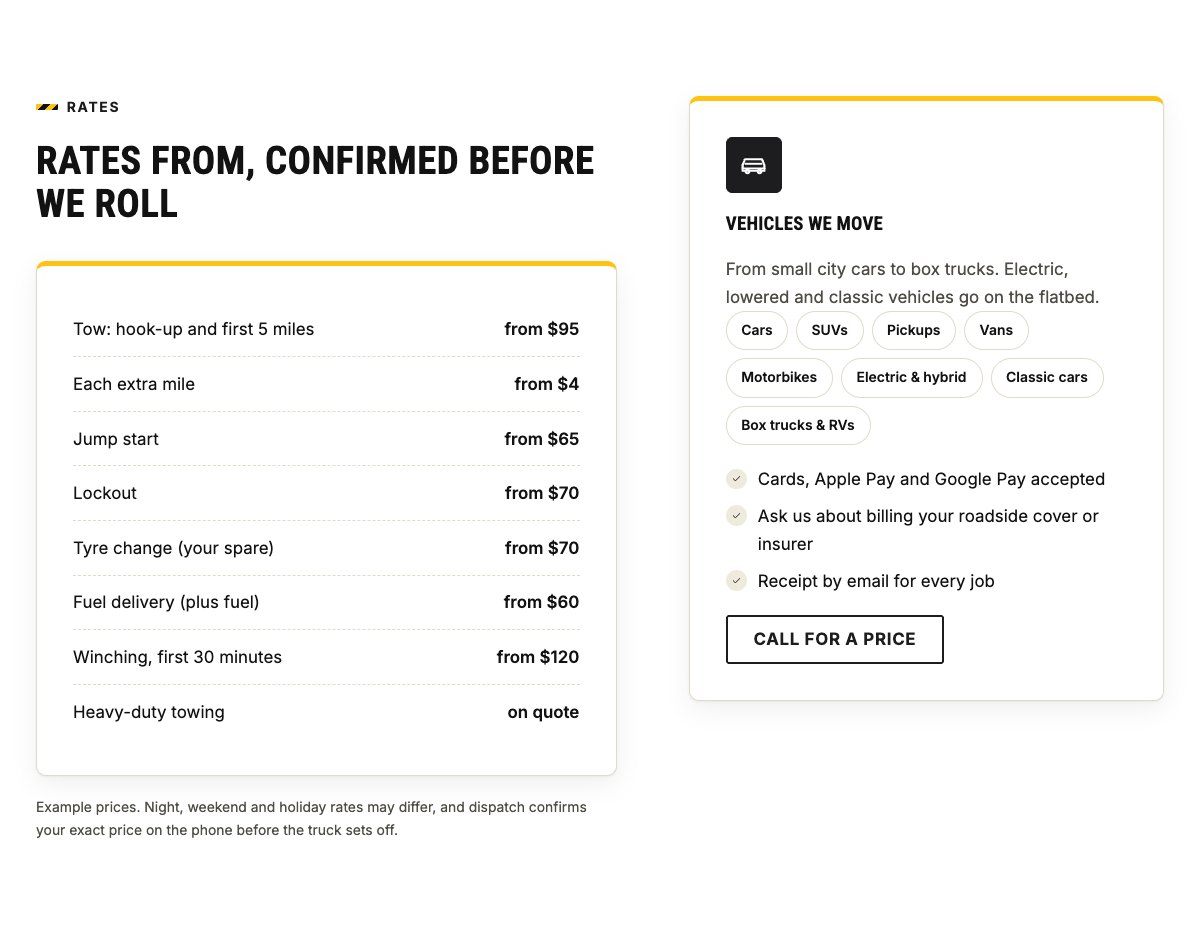
| Rates from | Sample starting rates per job and per mile, the vehicles you move and payment options. |
| Our fleet | Your trucks, what each one is for, and the kit on every truck, next to a flatbed illustration. |
| While you wait | Six general safety tips for waiting at the roadside. |
| Our team | Team cards with photo, role and bio. |
| Customer reviews | Three review cards (use real reviews only). |
| Frequently asked questions | Expandable questions about waiting safely, insurance and roadside plans, payment, cost, passengers and drop-off. |
| Coverage area and hours | Towns and roads you cover, dispatch and office hours, yard address, phone and a coverage map with directions. |
| Contact cards | Dispatch, office email and vehicle collection cards. |
| Breakdown banner | Hazard-yellow strip with a call button. |
| Call dispatch call to action | Dark band with a big call button and a Plan a transport email button. |
Page layouts (Pro)
- Home page: the complete homepage.
- Services page: services, rates, fleet, safety tips, FAQ, breakdown banner and call to action.
- About page: your story, response times, what happens when you call, team and reviews.
- Contact page: contact cards, breakdown banner, coverage area, hours and map.
Demo content to replace
- Phone
(555) 016-4763, email[email protected]and the Junction Road address (header, hero, contact sections, banners and footer). - Dispatch, office and collection hours (top bar, footer, coverage area) and the trust points in the hero.
- Example rates in the rates section and example arrival times in the response-times band.
- Lines marked “(sample)”: the towing licence number and insurance line in the about section, and the motor club named in the insurance answer of the FAQ.
- The vehicles in the fleet section, the towns and roads in the coverage area, team names, roles and photos, and the sample reviews.
- The “Plan a transport” button: point it to your own form if you have one.
Only state the licence numbers, insurance cover, payment methods and partnerships your company really has. Do not invent awards, “cars towed” counts, ratings or guaranteed arrival times: keep response times as real averages with the note about traffic and weather, and check the safety tips against your local road rules and emergency number.
Photo guide
Replace the illustrations and placeholder portraits with your own photos: select the image in the editor, then Replace. These sizes look sharp on large screens without slowing the site down.
| Image | Shape | Upload size | Tips |
|---|---|---|---|
| About photo | Landscape 5:4 | 1600 × 1280 px | One of your trucks at work with a driver, loading a vehicle safely. Blur number plates if you prefer. |
| Fleet photo | Landscape 5:4 | 1600 × 1280 px | A clean flatbed or tow truck, parked safely, ideally with a vehicle strapped down. |
| While you wait photo | Landscape 5:4 | 1600 × 1280 px | A driver waiting calmly by the roadside. Ask before photographing customers. |
| Team photos | Portrait 4:5 | 800 × 1000 px | Head and shoulders in work clothes or hi-vis, same background for everyone. |
| Map picture | Landscape 3:2 | 1600 × 1040 px | A screenshot of your coverage area, or keep the illustration; the button links to Google Maps. |
| Blog featured images | Landscape 3:2 | 1600 × 1067 px | Shown on the blog cards and at the top of each post: trucks, roadside help, tyres or batteries. |
| Logo (header and footer) | Wide or square | At least 200 px tall, PNG with a transparent background or SVG | Shown about 44 px tall. Set it in Appearance → Editor: select the logo block. |
| Site icon | Square | 512 × 512 px | The small icon in browser tabs. Settings → General → Site Icon. |
- Save photos as JPEG or WebP and keep each file under about 300 KB (a free tool such as squoosh.app does this).
- WordPress crops to the shape for you: select the image → Crop in the toolbar to choose which part shows.
- Fill in the Alternative text of each photo (for example “Our reception desk”) for accessibility and Google.
- Only use photos you own or have permission for. Ask clients before you publish photos of them.
Colour styles
Default (black and hazard yellow), Night Shift (navy and amber), Flare (road-flare red and yellow) and Reflector (forest green and hi-vis lime). Try them in the live demo with the colour dots in the top bar.