Watch the 2-minute setup
LT Voyara is a block theme for travel agencies, tour planners and independent travel advisers. See it live in the demo.
Section patterns (Pro)
| Pattern | Use it for |
|---|---|
| Hero with plan my trip card | Light hero with headline, buttons and your licence line, next to a boarding-pass style card that shows where, when and who, with a Start planning button. |
| Trip types | Six cards with icons: honeymoons, family holidays, adventure trips, cruises, group tours and beach escapes. |
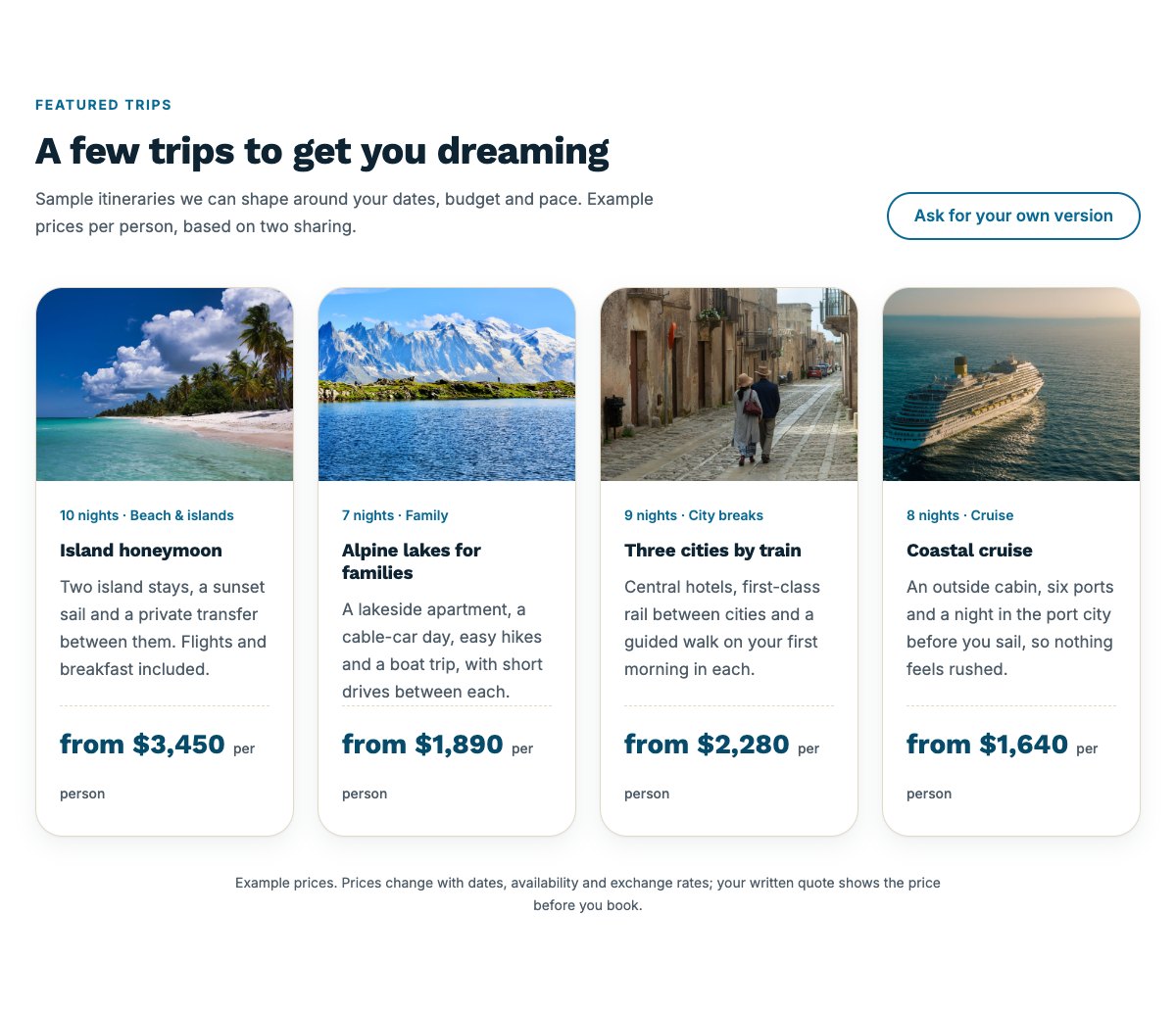
| Featured trips | Four sample trip cards with a photo, length and type, what is included and a from-price per person, with an example price note. |
| How planning works | Four numbered steps: tell us your idea, get a draft plan, fine-tune and book, travel with backup. |
| Destinations | Six portrait destination tiles with the region, the kind of trip it suits and the best months to go. |
| About the agency | Illustration or photo, your story and a checklist of what travellers can count on. |
| Why book with us | Four reasons with icons: planned around you, clear written prices, protected bookings and help while you travel. |
| Travel experts | Three team cards with photo, name, speciality and a short bio. |
| Traveller reviews | Three review cards (use real reviews only). |
| Planning fees and payments | Planning fee list next to deposit, balance, payment methods and booking protection details. |
| Frequently asked questions | Planning time, booking protection, payments, visas and passports, changes after booking and help while away. |
| Office and opening hours | Office hours, address, phone and email, with a map and a directions button. |
| Contact cards | Call, email and visit the office cards. |
| Travel support banner | Coral strip with the support line for travellers who are already away. |
| Plan your trip call to action | Blue band with a Plan my trip button for your enquiry form and a phone button. |
| Latest articles | Your three newest blog posts as cards. |
Page layouts (Pro)
- Home page: the complete homepage.
- Trips page: trip types, featured trips, planning fees and payments, destinations, FAQ and the plan your trip band.
- About page: your story, reasons to book, travel experts, reviews, how planning works and the plan your trip band.
- Contact page: contact cards, the travel support banner and office hours with a map.
Demo content to replace
- Phone and support line
(555) 016-4939, email[email protected]and the Compass Row address (header, footer, contact sections). - “Licence no. 000000 (sample)” and “membership no. 000000 (sample)” (hero, footer, Why book with us, FAQ): use your real registration and booking protection details, or remove the lines.
- The four sample trips and their example from-prices, the six example planning fees, the deposit and balance terms and every other line marked “(sample)”.
- The sample enquiry in the Plan my trip card, the trip types you really plan, the six destinations and their best months, and the office hours.
- Travel expert names, specialities and photos; sample traveller reviews; the trip and destination photos.
- The “Plan my trip” and “Start planning” buttons: link them to your enquiry form or booking page (the main button currently opens an email).
Prices in the demo are examples: keep a note that the written quote shows the price before booking, and do not promise the lowest price. Never show a licence, bonding or booking protection scheme, an award or an accreditation logo your agency does not hold, keep visa advice general (the destination country decides), and only publish real reviews.
Photo guide
Replace the illustrations and placeholder portraits with your own photos: select the image in the editor, then Replace. These sizes look sharp on large screens without slowing the site down.
| Image | Shape | Upload size | Tips |
|---|---|---|---|
| About photo | Landscape 5:4 | 1600 × 1280 px | Your office, a planning session over a map, or a trip detail that feels like your agency. |
| Featured trip photos (4) | Landscape 4:3 | 1600 × 1200 px | One strong photo per trip: the beach, the lake, the city street, the ship. Similar light and colour for all four. |
| Destination tiles (6) | Portrait 4:5 | 1000 × 1250 px | One place per tile, with calm space at the bottom: the name and details sit on a dark fade over the lower third. |
| Travel expert photos | Portrait 4:5 | 800 × 1000 px | Head and shoulders with space above the head, same light and background for everyone. |
| Map picture | Landscape 3:2 | 1600 × 1040 px | A screenshot of your map, or keep the illustration; the button links to Google Maps. |
| Blog featured images | Landscape 3:2 | 1600 × 1067 px | Shown on the blog cards and at the top of each post. |
| Logo (header and footer) | Wide or square | At least 200 px tall, PNG with a transparent background or SVG | Shown about 44 px tall. Set it in Appearance → Editor: select the logo block. |
| Site icon | Square | 512 × 512 px | The small icon in browser tabs. Settings → General → Site Icon. |
- Save photos as JPEG or WebP and keep each file under about 300 KB (a free tool such as squoosh.app does this).
- WordPress crops to the shape for you: select the image → Crop in the toolbar to choose which part shows.
- Fill in the Alternative text of each photo (for example “Our reception desk”) for accessibility and Google.
- Only use photos you own or have permission for. Ask clients before you publish photos of them.
Colour styles
Default (ocean blue and sunset coral), Lagoon, Dune and Aurora. Try them in the live demo with the colour dots in the top bar.