Watch the 2-minute setup
LT Tutora is a block theme for tutoring centres, learning centres and private tutors. See it live in the demo.
Section patterns (Pro)
| Pattern | Use it for |
|---|---|
| Hero with assessment card | Headline, two buttons, a tick line (ages, formats) and a “book a free assessment” card with three simple steps. |
| Centre at a glance | Four key facts on a tinted band: ages taught, group size, free assessment, progress reports. |
| Subjects and programs | Six program cards with icon tiles: maths, English and reading, science, exam preparation, online tutoring, study skills and homework club. |
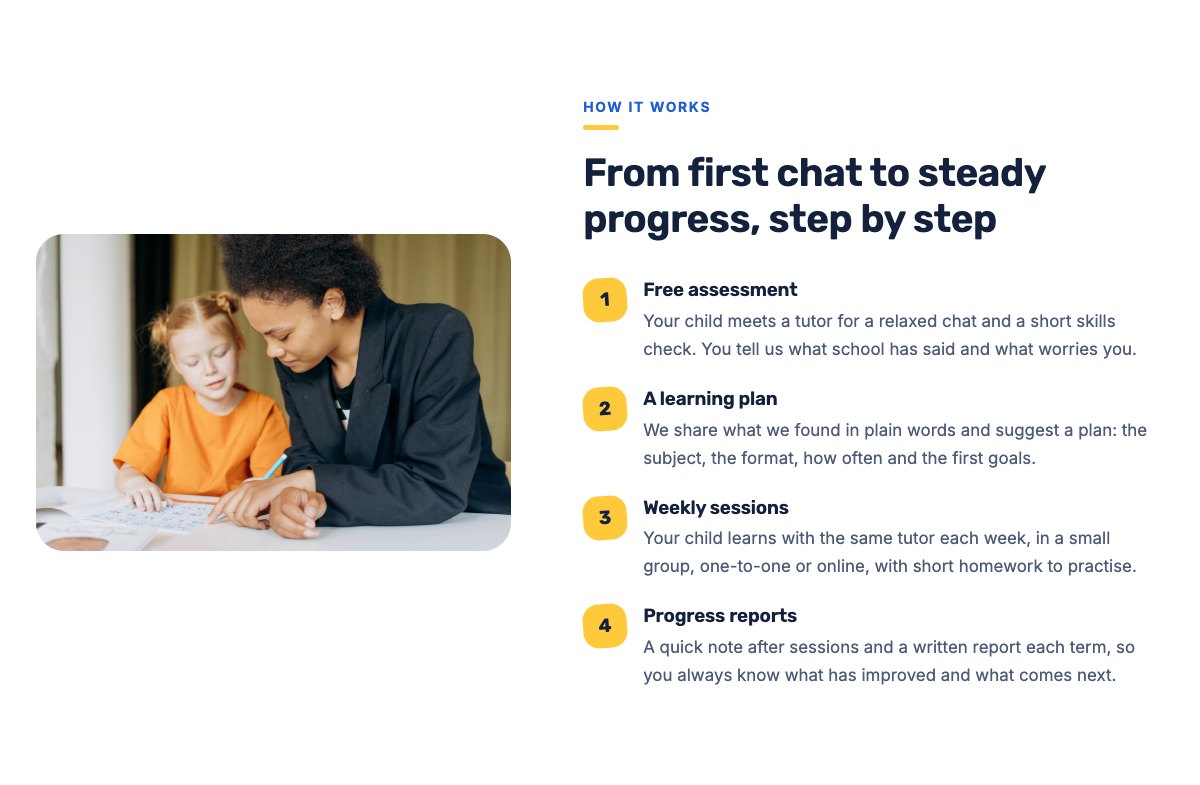
| How it works | Tutor picture next to four numbered steps from the free assessment to termly progress reports. |
| About the centre | Picture of a small group lesson, your story and a checklist of what families can expect. |
| Our approach | Four points with icons: small groups, clear goals, regular updates, safety first. |
| Our tutors | Three tutor cards with photo, subjects and bio. |
| Parent reviews | Three review cards (use real reviews only). |
| Example results | Three sample progress stories (before and after) with a note that they are examples. |
| Pricing plans | Small group, one-to-one and online plans with example prices and what each includes. |
| Frequently asked questions | Ages, group size, progress reports, the free assessment, the curriculum and missed sessions. |
| Centre hours and location | Centre hours, address, phone and a map with directions. |
| Contact cards | Call, email and visit cards. |
| Safeguarding banner | Highlighted strip with your safeguarding lead and a link to your safeguarding policy. |
| Free assessment call to action | Coloured band with assessment and phone buttons. |
| Latest articles | Your three newest blog posts. |
Page layouts (Pro)
- Home page: the complete homepage.
- Programs page: subjects and programs, how it works, example results, pricing plans, FAQ and the free assessment band.
- About page: centre story, centre at a glance, tutors, approach, example results and parent reviews.
- Contact page: contact cards, safeguarding banner and centre hours with map.
Demo content to replace
- Phone
(555) 016-4851, email[email protected]and the Willow Bank Road address in Springfield (header, footer, hero, contact sections). - Centre hours (top bar, footer, hours section) and the facts in the “Centre at a glance” band (ages, group size, reports).
- The six programs, the three pricing plans with their example prices, and the sibling discount note.
- Tutor names, subjects, bios and photos; sample parent and student reviews.
- The three example progress stories marked “Example (sample)”: replace them with real stories families agreed to share, or remove the section.
- The safeguarding lead marked “(sample)” and the Safeguarding policy, Privacy policy and Accessibility links.
- The “Book a free assessment” buttons: link them to your booking or enquiry form.
Never promise grades, exam passes or school places, and do not show awards, accreditations, pass rates or other statistics you cannot prove. Prices and results in the demo are examples. Name your real safeguarding lead, link to your written safeguarding policy and describe only the background checks your tutors really have. Use photos and names of children only with written permission from their parents.
Photo guide
Replace the illustrations and placeholder portraits with your own photos: select the image in the editor, then Replace. These sizes look sharp on large screens without slowing the site down.
| Image | Shape | Upload size | Tips |
|---|---|---|---|
| About photo | Landscape 5:4 | 1600 × 1280 px | A small group lesson or children working together at the centre (with permission). |
| How it works photo | Landscape 5:4 | 1600 × 1280 px | A tutor helping a student at a desk. |
| Tutor photos | Portrait 4:5 | 800 × 1000 px | Head and shoulders, same background and light for everyone. |
| Map picture | Landscape 3:2 | 1600 × 1040 px | A screenshot of your map, or keep the illustration; the button links to Google Maps. |
| Blog featured images | Landscape 3:2 | 1600 × 1067 px | Shown on the blog cards and at the top of each post. |
| Logo (header and footer) | Wide or square | At least 200 px tall, PNG with a transparent background or SVG | Shown about 44 px tall. Set it in Appearance → Editor: select the logo block. |
| Site icon | Square | 512 × 512 px | The small icon in browser tabs. Settings → General → Site Icon. |
- Save photos as JPEG or WebP and keep each file under about 300 KB (a free tool such as squoosh.app does this).
- WordPress crops to the shape for you: select the image → Crop in the toolbar to choose which part shows.
- Fill in the Alternative text of each photo (for example “Our reception desk”) for accessibility and Google.
- Only use photos you own or have permission for. Ask clients before you publish photos of them.
Colour styles
Default (bright blue and sunshine yellow), Chalkboard (chalkboard green and chalk yellow), Crayon (violet and tangerine) and Library (brick red and warm gold). Try them in the live demo with the colour dots in the top bar.
Bookings and forms
LT Tutora has no built-in form. Link the “Book a free assessment” buttons to your booking or enquiry page, or add a form plugin’s block (WPForms, Fluent Forms, Contact Form 7…) to the Contact page.