Watch the 2-minute setup
LT Carvera is a block theme for butchers, delis and meat counters: cuts to order for collection, BBQ and meat boxes, deli and cheese, and butchery classes. Its look comes from the counter itself: white enamel and marble, charcoal, oxblood and a black price ticket on every tray. See it live in the demo.
Section patterns (Pro)
| Pattern | Use it for |
|---|---|
| Hero with order card | A tall headline with order and phone buttons, next to a sample order: the cut, how it is prepared, when to collect, how to pay and the price on a counter ticket. A wide picture of the counter below. |
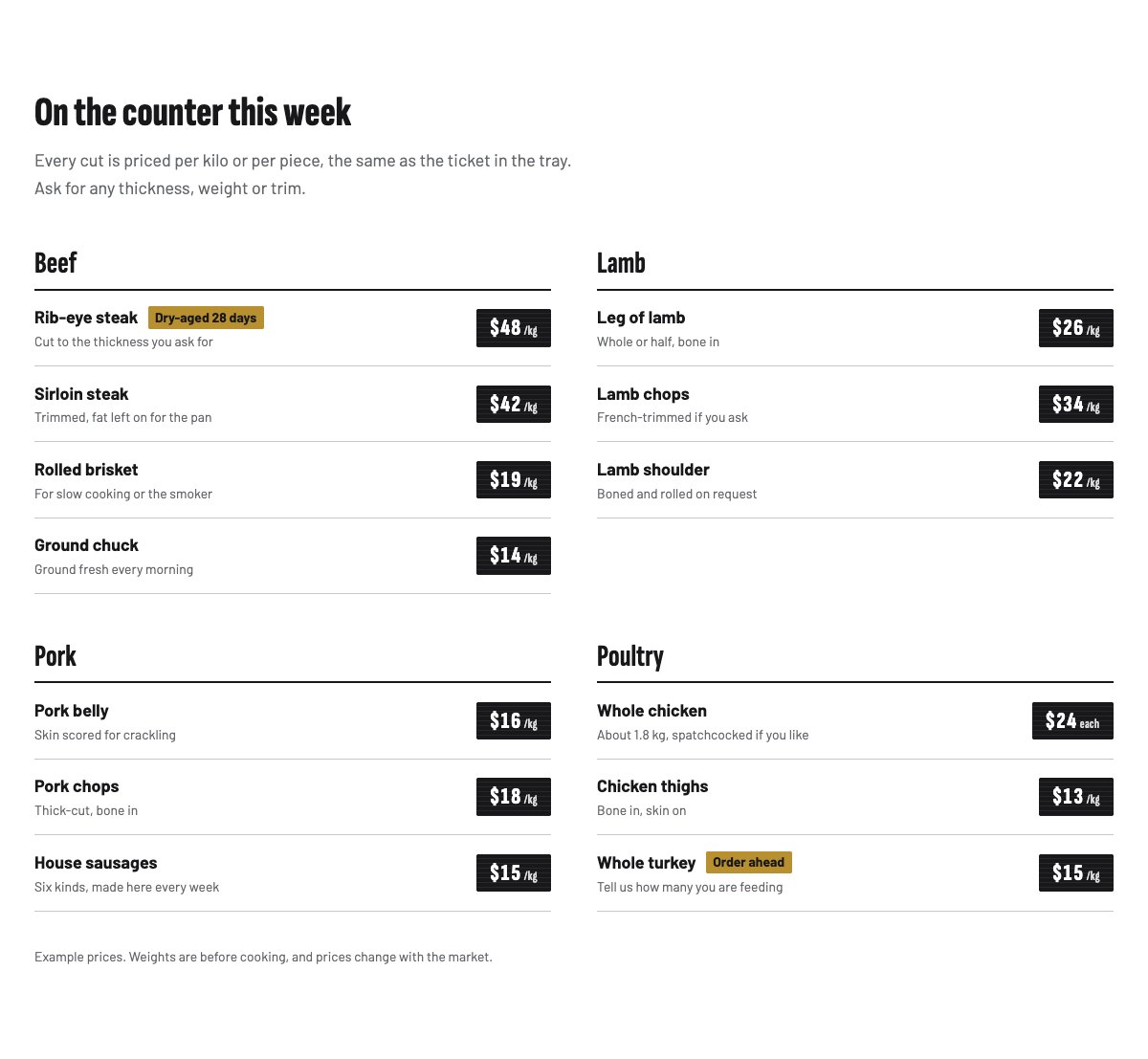
| The counter: cuts and prices | Beef, lamb, pork and poultry trays. Every line ends in a black counter ticket with the price per kilo or per piece; brass marks for dry-aged cuts and order-ahead items. |
| Cut chart | A line drawing of a beef side with nine numbered cuts. Each number links to the cut in the list, which says what it is good for. |
| Deli and cheese | Picture of the deli, sliced-to-order lines with tickets, and an allergen note. |
| BBQ and meat boxes | Three boxes with who they feed, what is inside and the price on a large ticket. |
| How to order | Three numbered steps: you order, we cut, you collect. |
| Holiday roasts | An “Order ahead” mark, holiday items and the last order and collection dates. |
| Our farms | Picture of the farms and how you buy and break down your meat, with a ticked list. |
| Butchery classes | Three classes with when they run and the price, next to a picture of a roast being tied. |
| Behind the counter | Three portraits with role and a one-line bio. |
| Customer reviews | Three short quotes under heavy rules (use real reviews only). |
| Frequently asked questions | Ordering ahead, keeping and freezing meat, allergens in the deli, special cuts, paying. |
| Opening hours and location | Opening hours, address with collection parking, phone and a map with directions. |
| Contact details | Call, email or come to the counter, each under a heavy rule. |
| Order for collection | Oxblood band with the order deadline, an email order button and the phone number. |
| Latest articles | Your three newest blog posts. |
Page layouts (Pro)
- Home page: the complete homepage.
- Counter page: the counter, cut chart, deli and cheese, meat boxes, how to order, holiday roasts, FAQ and the order call to action.
- About page: your farms, butchery classes, the team, reviews and the order call to action.
- Contact page: contact details, opening hours with map, FAQ and the order call to action.
Demo content to replace
- Phone
(555) 017-0118, email[email protected]and the Market Street address in Springfield (header, footer, hero, contact sections), and the collection parking note. - Opening hours and the “Order by Thursday for Saturday” deadline in the top bar, footer, steps, FAQ and order band.
- Every cut, note and price on the counter, the “Dry-aged 28 days” and “Order ahead” marks, and the “Example prices” notes.
- The sample order card in the hero (“Example order and price”).
- Deli lines and prices, and the allergen note marked “(sample note)”: list the allergens you really handle.
- Meat boxes, their contents and prices; holiday dates marked “Sample dates” and the deposit “(example policy)”.
- Your farms and sourcing (“Sample sourcing details.”), the classes, the three sample team members and their photos, and the reviews from “Sample customer”.
- The “Order for collection” buttons: they lead to your email and phone; link them to your order form if you take orders online.
Write only what is true for your shop. Do not add organic, grass-fed, free-range, animal-welfare, halal, kosher or origin claims unless you hold the certificate or can show where the meat comes from. Keep the allergen note in the deli and list the allergens you really handle. Prices on the counter change with the market, so keep a short note that they may change. Publish reviews only from real customers who agreed to it.
Photo guide
Replace the illustrations and placeholder portraits with your own photos: select the image in the editor, then Replace. These sizes look sharp on large screens without slowing the site down.
| Image | Shape | Upload size | Tips |
|---|---|---|---|
| Counter photo | Wide 21:9 | 1600 × 686 px | Your counter or a tray of cuts, raw and appetising, without blood or price tags you do not want to show. |
| Deli photo | Square 1:1 | 1200 × 1200 px | Cheese, cured meats or a deli board. |
| BBQ photo | Landscape 3:2 | 1600 × 1067 px | Steaks and sausages on a grill. |
| Farm photo | Landscape 5:4 | 1600 × 1280 px | Animals at a farm you buy from, with the farmer’s permission. |
| Class photo | Portrait 4:5 | 800 × 1000 px | Hands tying a roast or a class at the counter. Ask each person before you publish. |
| Team photos | Portrait 4:5 | 800 × 1000 px | Head and shoulders in an apron, same background and light for everyone. |
| Map picture | Landscape 3:2 | 1600 × 1040 px | A screenshot of your map, or keep the illustration; the button links to Google Maps. |
| Blog featured images | Landscape 3:2 | 1600 × 1067 px | Shown on the blog cards and at the top of each post. |
| Logo (header and footer) | Wide or square | At least 200 px tall, PNG with a transparent background or SVG | Shown about 44 px tall. Set it in Appearance → Editor: select the logo block. |
| Site icon | Square | 512 × 512 px | The small icon in browser tabs. Settings → General → Site Icon. |
- Save photos as JPEG or WebP and keep each file under about 300 KB (a free tool such as squoosh.app does this).
- WordPress crops to the shape for you: select the image → Crop in the toolbar to choose which part shows.
- Fill in the Alternative text of each photo (for example “Our reception desk”) for accessibility and Google.
- Only use photos you own or have permission for. Ask clients before you publish photos of them.
Colour styles
Counter (default: counter white, marble, charcoal, oxblood and brass), Smokehouse (dark smoke with ember tones), Deli (deli green and mustard) and Coastal (fishmonger blue with a lemon mark). The counter tickets stay black in every style. Try them in the live demo with the colour dots in the top bar.
Taking orders
LT Carvera has no built-in order form or shop. The “Order for collection” buttons lead to the order section with your email and phone; link them to your order form or online shop if you have one. Ask only for what you need to prepare the order: name, phone, what they want, the weight or number of people, and the collection day.