Watch the 2-minute setup
LT Cruxa is a block theme for climbing and bouldering gyms: day passes, memberships, inductions for first-timers, technique classes and a kids’ club. Its look comes from the gym wall itself: route setters mark every climb with a strip of coloured tape and a grade, and in the theme the tape colour always means something. See it live in the demo.
Section patterns (Pro)
| Pattern | Use it for |
|---|---|
| Hero with climbing wall and first visit card | A large headline next to a small wall. Each hold carries a start tape that links to Bouldering, Ropes, Kids or Classes. Next to it, a first visit card (induction, length, what is included, age, price). |
| Bouldering and roped climbing | The two ways to climb side by side, each with a picture, a short text and wall height, grades and what you need. |
| How the first visit works | Four numbered steps: book an induction, learn the basics, climb, come back on your own. |
| Prices | Day pass, 10-visit card and membership under heavy rules. A marker tape sits on the tier that really is the best value. |
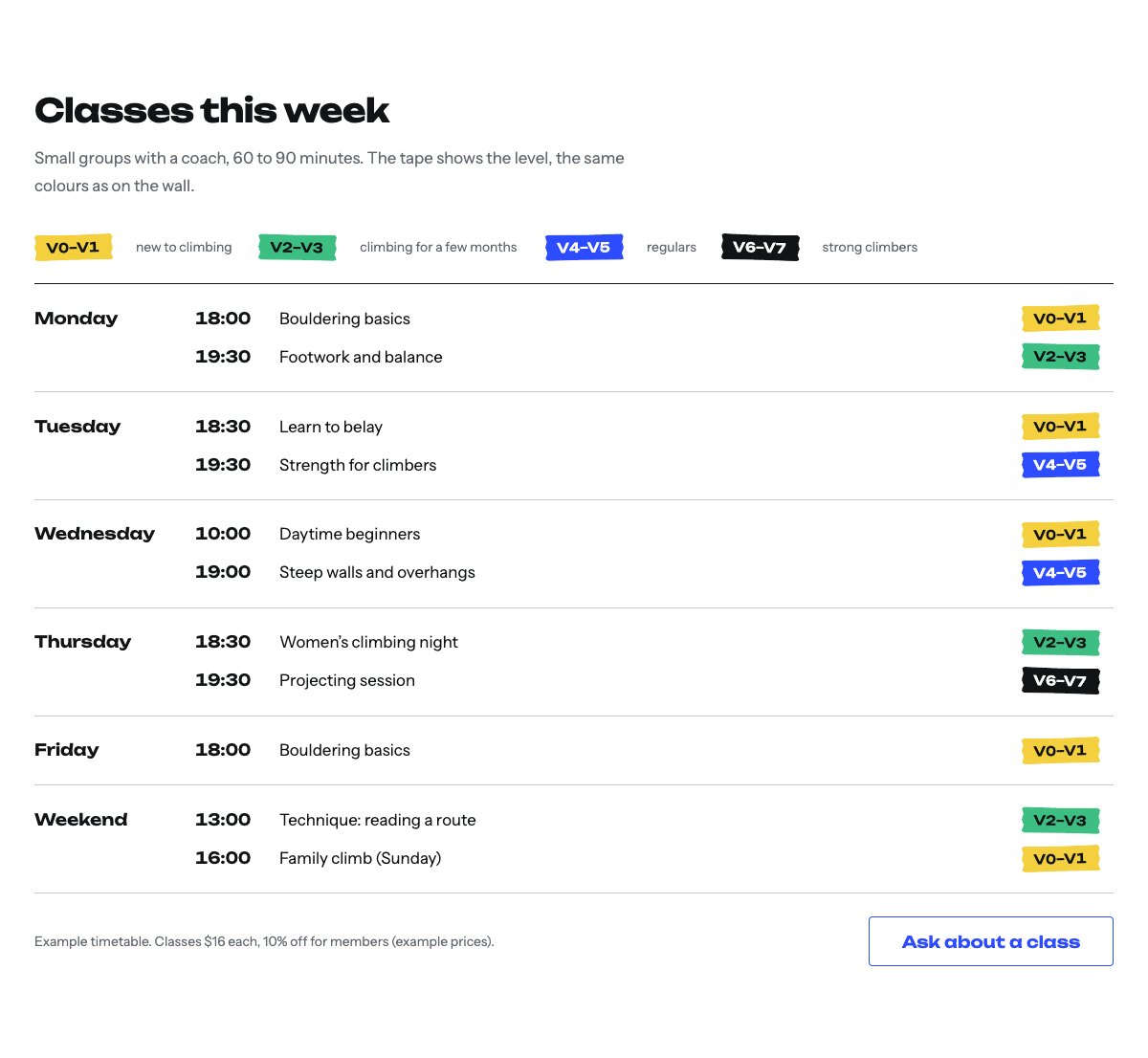
| Class timetable with grade tape | The week’s classes, one row per day, each with a tape that shows its level in the same colours as the wall. |
| Grades explained | The V-scale as a tape ladder from V0 at the bottom to V7 at the top, with one line per grade. |
| Kids’ club | A picture, age groups marked with the tape they climb, rules for parents and a booking button. |
| Gear hire | Shoes, harness, chalk, belay device and helmets, one row per item with an icon and a price. |
| About the gym | Picture, the gym’s story and four ticked points. |
| Setters and coaches | Three portraits with each person’s job and a one-line bio. |
| Reviews from climbers and parents | Three sample quotes (use real reviews only). |
| Frequently asked questions | No experience, shoes, the waiver, age limits, what to wear and coming alone. |
| Opening hours and location | Opening hours, address, parking, phone and a map with directions. |
| Contact details | Call, email and visit, each under a hairline. |
| Induction call to action | Deep blue band with the induction booking and phone buttons. |
| Latest articles | Your three newest blog posts. |
Page layouts (Pro)
- Home page: the complete homepage.
- Climb page: bouldering and ropes, the first visit, prices, class timetable, grades, kids’ club, gear hire, FAQ and the call to action.
- About page: the gym’s story, setters and coaches, reviews, how the first visit works and the call to action.
- Contact page: contact details, questions before your first visit, opening hours with map and the call to action.
What the tape colours mean
The magenta marker tape means “start here”: the hero links, the first visit card and the best-value price tier (remove it if that tier is not the best value at your prices). The grade tapes mark levels: V0–V1, V2–V3, V4–V5 and V6–V7. If your wall uses other colours or another grade scale, change the tape colours in the Site Editor styles (or ask your AI assistant with the prompts in the AI kit) so the website matches the wall.
Demo content to replace
- Phone
(555) 017-0112, email[email protected]and the Quarry Road address in Springfield (header, footer, hero, contact sections), and the parking note. - Opening hours in the top bar, footer and the opening hours section.
- The first visit card: induction length, what is included, age rule and the example price.
- Wall heights and numbers of lines, marked “Sample wall heights and numbers of lines”.
- Prices for the day pass, 10-visit card, membership, induction, classes, kids’ club and gear hire, marked “Example prices”.
- The class timetable (every day, time and level), marked “Example timetable”.
- Kids’ club groups and the parent and waiver rules marked “(placeholder policy)” or “(example policy)”, and the waiver answer in the FAQ.
- The three sample setters and coaches, their bios and photos, and the sample reviews from “Sample climber” and “Sample parent”.
- The “Book your induction” buttons: link them to your booking system.
Write only what is true for your gym. Use your own waiver wording and wall rules, and never describe climbing as safe, injury-free or risk-free. Do not add staff qualifications, certifications or first-aid checks you cannot confirm, and publish reviews only from real climbers who agreed to it. Do not show children who can be identified in photos without a parent’s written permission: children seen from behind or at a distance work well.
Photo guide
Replace the illustrations and placeholder portraits with your own photos: select the image in the editor, then Replace. These sizes look sharp on large screens without slowing the site down.
| Image | Shape | Upload size | Tips |
|---|---|---|---|
| Bouldering and ropes photos | Landscape 4:3 | 1600 × 1200 px | Your walls with climbers seen from behind, colourful holds, chalked hands or a belayer at the rope. |
| Kids’ club photo | Portrait 4:5 | 1200 × 1500 px | A child climbing a low wall, seen from behind, with a coach nearby. |
| About photo | Landscape 5:4 | 1600 × 1280 px | A setter at work, the wall from across the room or a coach with a climber. |
| Team photos | Portrait 4:5 | 800 × 1000 px | Head and shoulders at the wall, same light for everyone. Ask each person before you publish. |
| Map picture | Landscape 3:2 | 1600 × 1040 px | A screenshot of your map, or keep the illustration; the button links to Google Maps. |
| Blog featured images | Landscape 3:2 | 1600 × 1067 px | Shown on the blog cards and at the top of each post. |
| Logo (header and footer) | Wide or square | At least 200 px tall, PNG with a transparent background or SVG | Shown about 44 px tall. Set it in Appearance → Editor: select the logo block. |
| Site icon | Square | 512 × 512 px | The small icon in browser tabs. Settings → General → Site Icon. |
- Save photos as JPEG or WebP and keep each file under about 300 KB (a free tool such as squoosh.app does this).
- WordPress crops to the shape for you: select the image → Crop in the toolbar to choose which part shows.
- Fill in the Alternative text of each photo (for example “Our reception desk”) for accessibility and Google.
- Only use photos you own or have permission for. Ask clients before you publish photos of them.
Colour styles
Chalk (default: chalk white, concrete, rubber black, Volume blue and magenta tape), Lights out (dark, for gyms that open late), Sandstone (warm rock reds with a teal tape) and Alpine (ice blue with an orange tape). Try them in the live demo with the colour dots in the top bar.
Induction bookings
LT Cruxa has no built-in form. Link the “Book your induction” buttons to your booking system, or add your form plugin’s block to the Contact page. Ask only for what you need to arrange the visit: name, the date and time, how many people, and whether anyone is under 18.