Watch the 2-minute setup
LT Hemline is a block theme for tailors and clothing alterations: hems, waists, sleeves and zips, repairs, made-to-measure suits, and wedding and formalwear fittings. Its look comes from the workroom: a chalk-white page, ink-black type, thread-navy buttons and one bright yellow tape measure that runs under the headline and becomes the price list. See it live in the demo.
Section patterns (Pro)
| Pattern | Use it for |
|---|---|
| Hero with tape measure and fitting slip | A large headline with a tape measure ruled underneath (it unrolls once when the page loads), two buttons and a fitting slip: what to bring, how long a fitting takes, drop-in hours and express turnaround. |
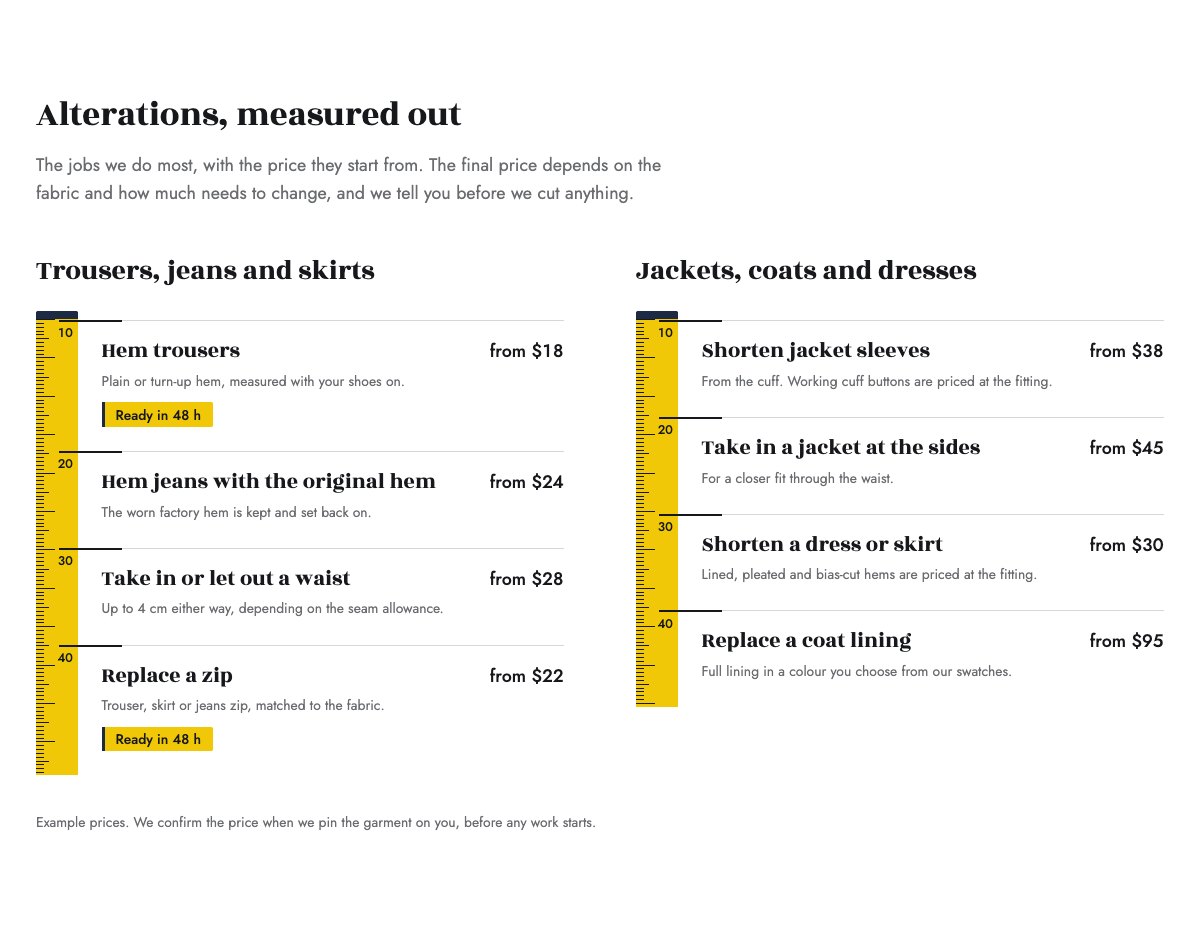
| Alterations price list on the tape | Two price lists read off a tape measure. Each alteration sits at a mark on the tape with its from-price; express jobs carry a “Ready in 48 h” tab. |
| Turnaround | Standard and express turnaround side by side, with a note about wedding and event dates. |
| Made to measure, step by step | A picture and four numbered steps: consultation, measuring, first fitting, final fitting. |
| Wedding and formalwear | What you fit for weddings and formal events, when to book the first fitting, and a picture. |
| Repairs | Six kinds of repair, each with a single-line drawing: mending, linings, zips and buttons, resizing, restyling, pressing. |
| About the workroom | Picture of the workroom, your story and a short tacked list of how every job is handled. |
| Our tailors | Three portraits with each tailor’s speciality and a one-line bio. |
| Reviews from customers | Three sample quotes (use real reviews only). |
| Frequently asked questions | What to bring to a fitting, appointments, timings, what can be altered, prices and storage. |
| Opening hours and location | Opening and drop-in hours, address, phone and a map with directions. |
| Contact details | Call, email and visit, each under a hairline. |
| Drop-in strip | Drop in without an appointment for hems and small repairs, between two dashed seam lines. |
| Fitting call to action | Thread-navy band with booking and phone buttons. |
| Latest articles | Your three newest blog posts. |
Page layouts (Pro)
- Home page: the complete homepage.
- Alterations page: price list, turnaround, repairs, wedding and formalwear, made to measure, FAQ and the call to action.
- About page: the workroom story, tailors, reviews, the drop-in strip and the call to action.
- Contact page: contact details, the drop-in strip, opening hours with map and the call to action.
Demo content to replace
- Phone
(555) 017-0123, email[email protected]and the Bobbin Lane address in Springfield (header, footer, hero, contact sections), and the short-stay parking note. - Opening hours and drop-in hours in the top bar, footer, hero slip, drop-in strip and hours section.
- The eight alterations and their from-prices on the two tapes, marked “Example prices”, and which jobs carry the “Ready in 48 h” tab.
- Turnaround times, the express surcharge, made-to-measure timings and price, wedding fitting advice and the storage period, each marked “(example)” or “Example times”.
- The three sample tailors, their specialities, bios and photos, and the sample reviews from “Sample customer”.
- The “Book a fitting” buttons: link them to your booking or scheduling system.
Write only what is true for your business. Do not add titles such as “master tailor”, guild or association memberships, years of experience or awards you cannot confirm, and do not promise a perfect fit or invisible repairs. Prices and turnaround times must match what you really charge and deliver. Publish reviews only from real customers who agreed to it, and ask before showing customers, especially brides, in photos.
Photo guide
Replace the illustrations and placeholder portraits with your own photos: select the image in the editor, then Replace. These sizes look sharp on large screens without slowing the site down.
| Image | Shape | Upload size | Tips |
|---|---|---|---|
| Workroom photo | Landscape 5:4 | 1600 × 1280 px | Your workroom or counter: sewing machines, the cutting table, rails of finished work. |
| Wedding photo | Portrait 4:5 | 1200 × 1500 px | A wedding dress or suit on a form, pinned for a fitting, or details such as a bustle or a hem. |
| Measuring photo | Landscape 5:4 | 1600 × 1280 px | A tailor measuring a sleeve or a client, or a jacket with a tape measure and chalk marks. |
| Tailor photos | Portrait 4:5 | 800 × 1000 px | Head and shoulders, ideally with a tape measure, same background and light for everyone. Ask each person before you publish. |
| Map picture | Landscape 3:2 | 1600 × 1040 px | A screenshot of your map, or keep the illustration; the button links to Google Maps. |
| Blog featured images | Landscape 3:2 | 1600 × 1067 px | Shown on the blog cards and at the top of each post. |
| Logo (header and footer) | Wide or square | At least 200 px tall, PNG with a transparent background or SVG | Shown about 44 px tall. Set it in Appearance → Editor: select the logo block. |
| Site icon | Square | 512 × 512 px | The small icon in browser tabs. Settings → General → Site Icon. |
- Save photos as JPEG or WebP and keep each file under about 300 KB (a free tool such as squoosh.app does this).
- WordPress crops to the shape for you: select the image → Crop in the toolbar to choose which part shows.
- Fill in the Alternative text of each photo (for example “Our reception desk”) for accessibility and Google.
- Only use photos you own or have permission for. Ask clients before you publish photos of them.
Colour styles
Chalk (default: chalk white, ink, thread navy and a pin-yellow tape), Pinstripe (charcoal with a pale blue and a brass tape), Tweed (moss green with a mustard tape) and Silk (wine red with a pink tape). Try them in the live demo with the colour dots in the top bar.
Fitting bookings
LT Hemline has no built-in form. Link the “Book a fitting” buttons to your booking or scheduling system, or add your form plugin’s block to the Contact page. Ask only for what you need to plan the fitting: a name, a phone number or email, the garment and, for weddings and events, the date.