Watch the 2-minute setup
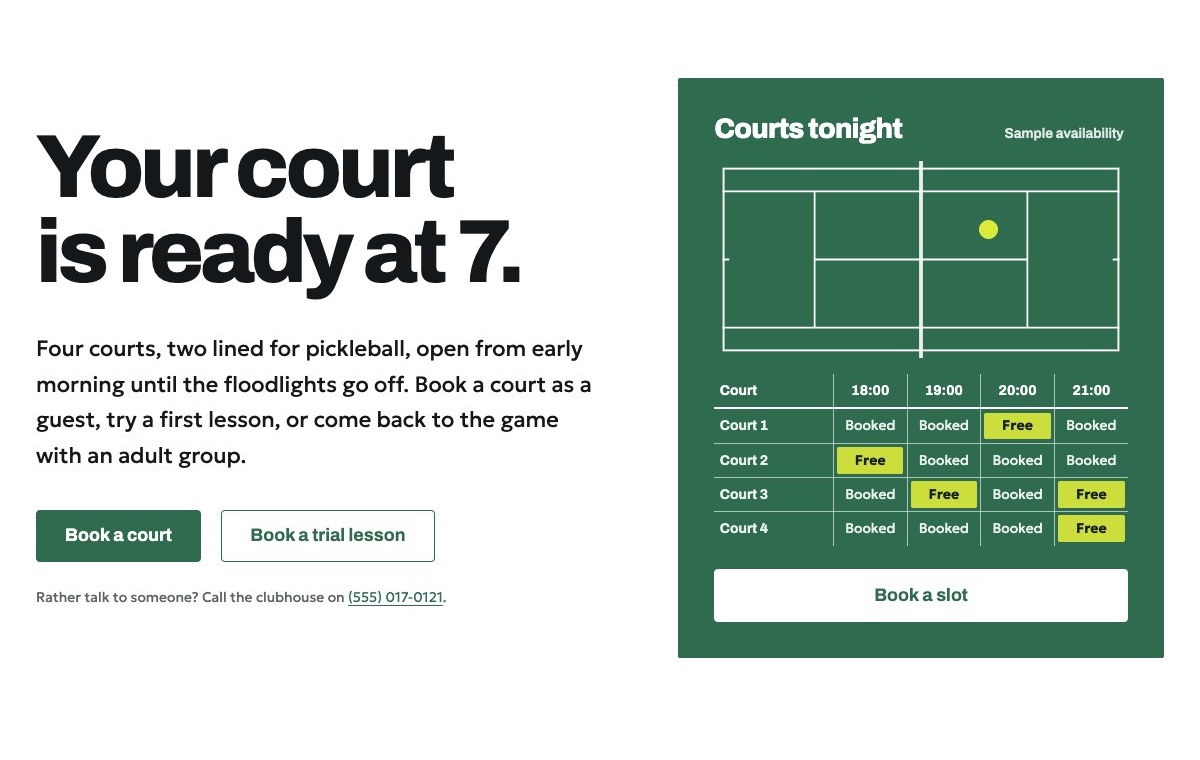
LT Baselina is a block theme for tennis and pickleball clubs: court booking, membership, coaching for juniors and adults, leagues and social play. Its look comes from a court seen from above: thin white lines on court green and one yellow ball for free slots. See it live in the demo.
Section patterns (Pro)
| Pattern | Use it for |
|---|---|
| Hero with court booking grid | A large headline next to a court-green card: the court plan (the ball bounces once on load) and tonight’s courts by hour, with free slots in yellow and a booking button. |
| Membership comparison table | Four tiers side by side: monthly fee, who it is for, booking window, evenings and weekends, pickleball, guest passes, leagues and coaching. |
| Coaching programme list | Mini tennis, junior groups, teen squad, adult beginners, cardio tennis and pickleball intro, with days, from-prices, a “Places free” mark and a trial link. |
| Leagues and social calendar | The season as a list: date, event and who can play, next to a trophy drawing. |
| Facilities in four boxes | Courts and floodlights, pickleball lines, clubhouse, racket and paddle hire, in a 2 × 2 grid split like service boxes. |
| Guest fees | Pay-and-play court hire and extras in two lists, with the “Example prices” note. |
| Coaches | Four portraits with what each coach teaches, a qualification line and a one-line bio. |
| Your first visit | Three numbered steps: book, check in at the clubhouse, play. |
| Member reviews | Three sample quotes (use real reviews only). |
| Frequently asked questions | Racket hire, dress code, booking rules, rain, guests and juniors. |
| About the club | Picture of the courts, the club’s story and a short ticked list. |
| Court hours and location | Court and clubhouse hours, address, phone and a map with directions. |
| Ways to reach the club | Book a court, book a trial lesson, ask about membership, each with its phone or email link. |
| Book a court or a trial lesson | Court-green band drawn as two service boxes split by the centre service line. |
| Latest articles | Your three newest blog posts. |
Page layouts (Pro)
- Home page: the complete homepage.
- Membership page: membership table, coaching groups, guest fees, FAQ and the booking section.
- About page: the club’s story, coaches, your first visit, facilities, reviews and the booking section.
- Contact page: ways to reach the club, FAQ, court hours with map and the booking section.
Demo content to replace
- Phone
(555) 017-0121, email[email protected]and the Linden Park Drive address in Springfield (header, footer, hero, FAQ, contact sections), and the parking note. - Court and clubhouse hours in the top bar, footer and the court hours section.
- The booking grid in the hero (courts, hours and free slots), labelled “Sample availability”.
- Every value in the membership table, “Example prices” and “(example policy)”.
- The coaching groups, age bands, days, times, prices and “Places free” marks.
- League and event dates marked “(sample dates)”, the guest fees and every rule marked “(example)”.
- The four sample coaches, the “Coaching qualification (sample)” lines, their bios and photos, and the sample reviews.
- The “Book a court” and “Book a trial lesson” buttons: link them to your booking system.
Write only what is true for your club. Do not add coaching qualifications, federation accreditations, background checks, rankings or playing records you cannot confirm. Publish reviews only from real members who agreed to it. Do not show children who can be identified in photos without a parent’s written permission: players seen from behind or at a distance work well. Avoid health or fitness promises.
Photo guide
Replace the illustrations and placeholder portraits with your own photos: select the image in the editor, then Replace. These sizes look sharp on large screens without slowing the site down.
| Image | Shape | Upload size | Tips |
|---|---|---|---|
| About photo | Landscape 5:4 | 1600 × 1280 px | Your courts from above or from the clubhouse terrace, ideally with players seen from a distance. |
| Coach photos | Portrait 4:5 | 800 × 1000 px | Head and shoulders, on court or by the net, same light for everyone. Ask each person before you publish. |
| Map picture | Landscape 3:2 | 1600 × 1040 px | A screenshot of your map, or keep the illustration; the button links to Google Maps. |
| Blog featured images | Landscape 3:2 | 1600 × 1067 px | Shown on the blog cards and at the top of each post. |
| Logo (header and footer) | Wide or square | At least 200 px tall, PNG with a transparent background or SVG | Shown about 44 px tall. Set it in Appearance → Editor: select the logo block. |
| Site icon | Square | 512 × 512 px | The small icon in browser tabs. Settings → General → Site Icon. |
- Save photos as JPEG or WebP and keep each file under about 300 KB (a free tool such as squoosh.app does this).
- WordPress crops to the shape for you: select the image → Crop in the toolbar to choose which part shows.
- Fill in the Alternative text of each photo (for example “Our reception desk”) for accessibility and Google.
- Only use photos you own or have permission for. Ask clients before you publish photos of them.
Colour styles
Court green (default: white lines, court green and ball yellow), Clay court (red-brown clay on white), Hard court (blue acrylic) and Floodlight (a dark night-court style with a lit green). Try them in the live demo with the colour dots in the top bar.
Court bookings
LT Baselina has no built-in booking system. The grid in the hero is an example that shows how your courts and hours look. Link the “Book a court” buttons to your club’s online booking system and the “Book a trial lesson” buttons to your coaching sign-up, or add your form plugin’s block to the Contact page.