Watch the 2-minute setup
LT Escapia is a block theme for escape room venues: themed rooms for groups of friends, families with teens, team building, birthday parties and gift vouchers. Its look comes from a case file: every room is a paper dossier on a dark desk, with a case number on the folder tab, a briefing with a phrase blacked out and a yellow difficulty stamp. See it live in the demo.
Section patterns (Pro)
| Pattern | Use it for |
|---|---|
| Hero with case file | The headline “You have 60 minutes.” in a large stencil face, two buttons, and a case file listing today’s next free slots with a yellow “Last slot” mark. The case number types itself in once when the page loads. |
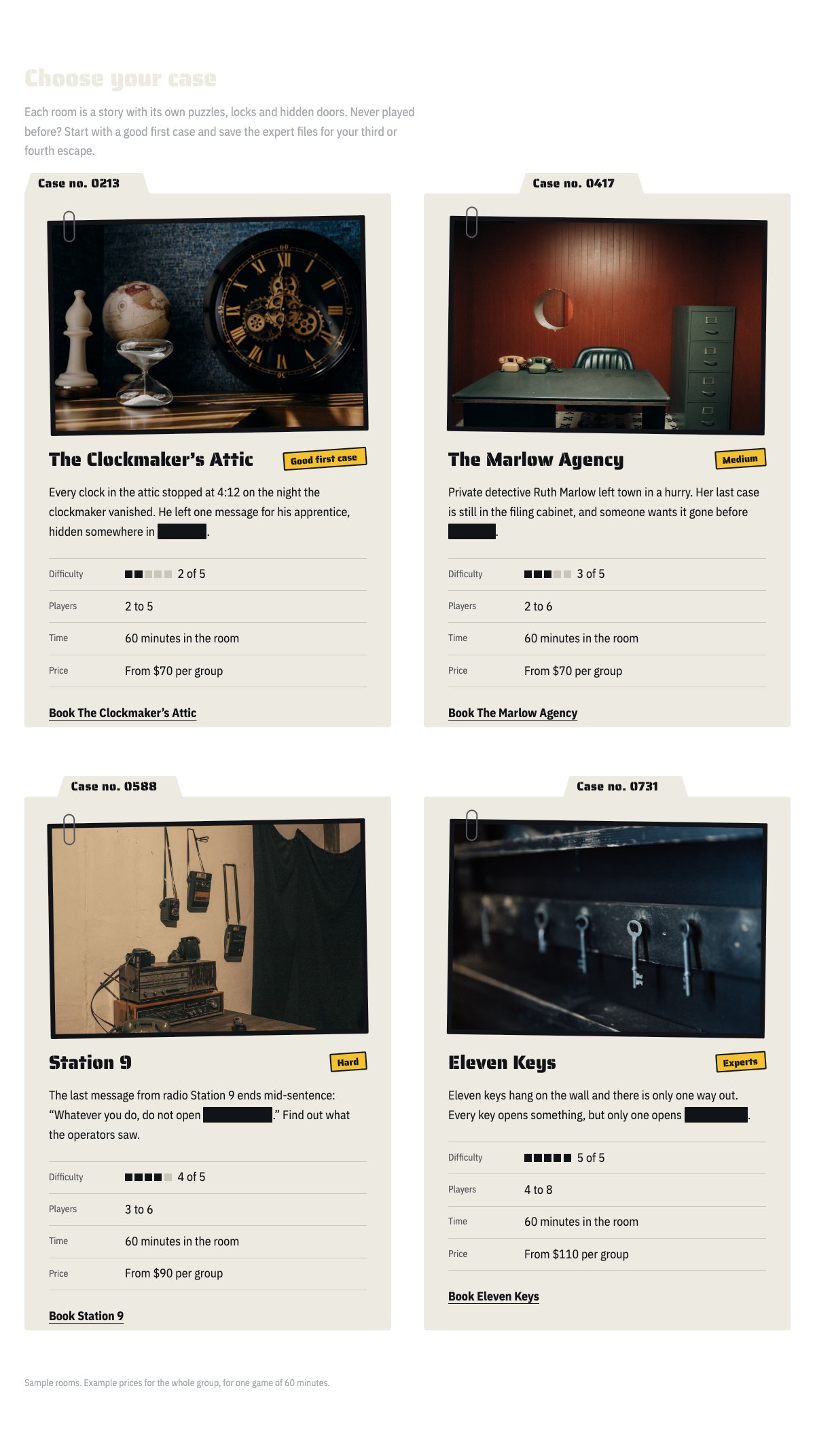
| Rooms as case files | Each room as a dossier: case number on the tab, evidence photo with a paper clip, room name and difficulty stamp, a short briefing with one blacked-out phrase, difficulty marks, players, time, price per group and a booking link. |
| How a game works | Four numbered steps: book a room, the briefing, sixty minutes, debrief and team photo. |
| Team building, parties and gift vouchers | Three offers under hairline rules, each with an icon, three facts and a link. |
| Prices per group | Prices by number of players next to notes on weekday prices, payment, cancellation and late arrival. |
| Leaderboard | This month’s fastest escapes: rank, team, room and time. |
| Safety and accessibility | The door is never locked, exits, camera, step-free rooms and help for nervous players. Confirm every line before you publish it. |
| About the venue | A picture of a group at work, your story and four ticked points. |
| Game masters | Three portraits with the room each person hosts and a one-line bio. |
| Reviews from players | Three sample quotes (use real reviews only). |
| Frequently asked questions | Minimum age, group size, arriving late, hints, whether it is scary and leaving during the game. |
| Game times and location | Game times, address, phone and a map with directions. |
| Contact details | Call, email and visit, each under a hairline. |
| Book a room call to action | A full-width sheet of dossier paper with booking and phone buttons. |
| Latest articles | Your three newest blog posts. |
Page layouts (Pro)
- Home page: the complete homepage.
- Rooms page: the rooms as case files, prices per group, team building, parties and vouchers, leaderboard, FAQ and the call to action.
- About page: your story, the game masters, safety and accessibility, reviews and the call to action.
- Contact page: contact details, game times with map, FAQ and the call to action.
Demo content to replace
- Phone
(555) 017-0120, email[email protected]and the Foundry Street address in Springfield (header, footer, contact sections), and the parking note. - Game times in the top bar, footer and the game times section.
- The four sample rooms (The Clockmaker’s Attic, The Marlow Agency, Station 9, Eleven Keys): case numbers, stories, stamps, difficulty, players, prices and pictures.
- Today’s free slots in the hero, marked “Sample times”.
- Prices per group and every note marked “(example)”, “(example policy)” or “Example prices”: weekday discount, payment and cancellation, late arrival, minimum age, team building, party and voucher terms.
- The leaderboard, marked “Sample leaderboard”.
- Every safety and accessibility line, marked “Sample safety and accessibility details”.
- The three sample game masters, their bios and photos, and the sample reviews from “Sample player”, “Sample team lead” and “Sample parent”.
- The “Book a room” buttons: link them to your booking system.
Write only what is true for your venue. “The door is never locked”, emergency exits, camera monitoring and step-free access are safety promises: keep each one only if it is true for every room. Use room names and stories you own, not the names of films, books or games. Publish reviews and leaderboard names only from players who agreed to it, and do not show young players who can be identified in photos without a parent’s written permission.
Photo guide
Replace the illustrations and placeholder portraits with your own photos: select the image in the editor, then Replace. These sizes look sharp on large screens without slowing the site down.
| Image | Shape | Upload size | Tips |
|---|---|---|---|
| Room photos | Landscape 3:2 | 1600 × 1067 px | One photo per room, shown clipped to its case file. The set, a prop or a lock in low light; no players needed. |
| About photo | Landscape 5:4 | 1600 × 1280 px | A group working on a puzzle, seen from behind or from the side. |
| Game master photos | Portrait 4:5 | 800 × 1000 px | Head and shoulders, same background and light for everyone. Ask each person before you publish. |
| Map picture | Landscape 3:2 | 1600 × 1040 px | A screenshot of your map, or keep the illustration; the button links to Google Maps. |
| Blog featured images | Landscape 3:2 | 1600 × 1067 px | Shown on the blog cards and at the top of each post. |
| Logo (header and footer) | Wide or square | At least 200 px tall, PNG with a transparent background or SVG | Shown about 44 px tall. Set it in Appearance → Editor: select the logo block. |
| Site icon | Square | 512 × 512 px | The small icon in browser tabs. Settings → General → Site Icon. |
- Save photos as JPEG or WebP and keep each file under about 300 KB (a free tool such as squoosh.app does this).
- WordPress crops to the shape for you: select the image → Crop in the toolbar to choose which part shows.
- Fill in the Alternative text of each photo (for example “Our reception desk”) for accessibility and Google.
- Only use photos you own or have permission for. Ask clients before you publish photos of them.
Colour styles
Night (default: a dark desk, dossier paper, signal-red buttons and an evidence-yellow stamp), Daylight (paper page with manila case files), Bunker (military green with amber buttons) and Neon (midnight purple with pink buttons and a cyan stamp). Try them in the live demo with the colour dots in the top bar.
Bookings
LT Escapia has no built-in booking engine. Link the “Book a room” buttons to your booking system, or add your booking plugin’s block to the Contact page. The free slots in the hero are plain text: update them, or replace the list with your usual game times if your booking system shows live availability.