Watch the 2-minute setup
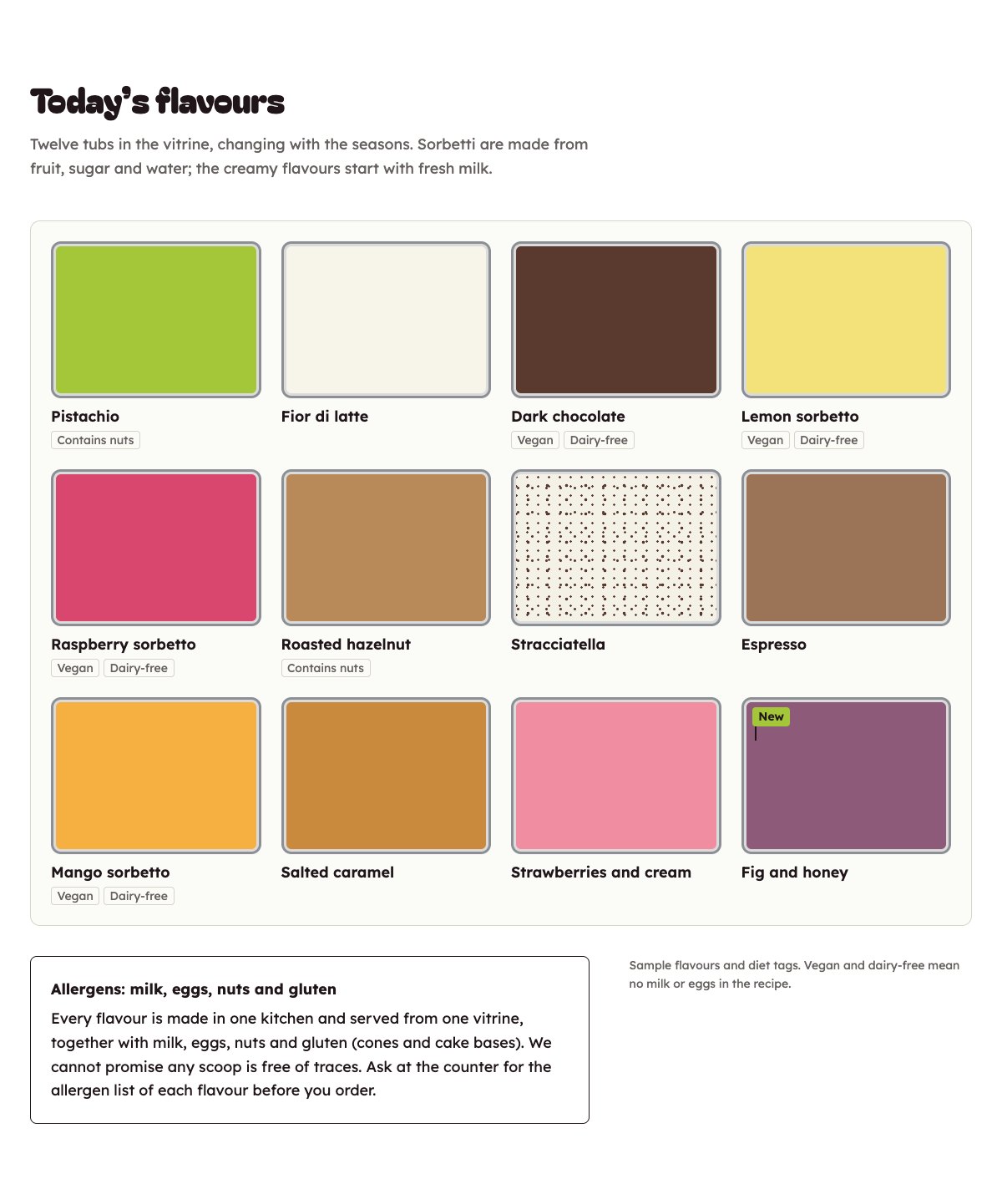
LT Gelatia is a block theme for gelato and ice cream parlours: scoops at the counter, take-home tubs, gelato cakes, catering and van hire for events. Its look comes from the counter itself: the vitrine seen from above, a grid of steel tubs, each in the colour of its flavour, with a little flag in the new one. See it live in the demo.
Section patterns (Pro)
| Pattern | Use it for |
|---|---|
| Hero with today’s vitrine | A big headline and opening line next to “Today in the vitrine”: six flavour tubs seen from above that fill up as the page loads. |
| Today’s flavours (the vitrine) | Twelve flavour tubs with diet tags as words (Vegan, Dairy-free, Contains nuts), a pistachio “New” flag and the allergen note. |
| How we make it | A picture of your kitchen and four numbered steps: milk and fruit, the base, the churn, the vitrine. |
| Cones, cups and tubs | A photo of a cone next to the price list, with a line drawing for cones, cups and take-home tubs. |
| Gelato cakes and catering | Cake sizes, party tubs and catering trays with prices, an order button and a cake picture. |
| Gelato van hire | A line drawing of the van, what comes with it and example prices for events. |
| Our story | A picture of the vitrine, your story and four ticked points. |
| Team | Three portraits with role and a one-line bio. |
| Reviews | Three sample quotes (use real reviews only). |
| Opening hours and location | Opening hours, address, phone and a picture of the shop front with a directions button. |
| Questions and allergens | Allergens in the kitchen, nut allergies, vegan options, tasting, cake orders and take-home tubs. |
| Contact details and map | Call, email and visit, each under a rule, and a map picture. |
| Order a cake or book the van | A raspberry band with an order request button and a phone button. |
| Latest articles | Your three newest blog posts. |
Page layouts (Pro)
- Home page: the complete homepage.
- Flavours page: all flavours, how they are made, cones, cups and tubs, cakes, van hire, the allergen FAQ and the order call to action.
- About page: your story, team, how the gelato is made, van hire, reviews and the call to action.
- Contact page: contact details with map, opening hours and location, the allergen FAQ and the call to action.
Change today’s flavours
Click a flavour name in the editor to change it. Each tub takes its colour from a class in Block → Advanced → Additional CSS class(es), for example gelatia-tub is-pistachio. Colours available: is-pistachio, is-fior-di-latte, is-cioccolato, is-limone, is-lampone, is-nocciola, is-stracciatella, is-caffe, is-mango, is-caramello, is-fragola, is-fico, is-mirtillo and is-menta. The diet tags are plain words: edit or delete them, and keep the “New” flag on one or two flavours at most.
Demo content to replace
- Phone
(555) 017-0119, email[email protected]and the Larkspur Street address in Springfield (header, footer, opening hours and contact sections), and the benches and parking note. - Opening hours in the top bar, hero, footer and the opening hours section.
- The flavours in the hero and the full vitrine, every diet tag and the “New” flag, marked “Sample flavours and diet tags”.
- The making steps, sizes and every price marked “Example prices” (cones, cups, tubs, cakes, catering and van hire), and the cake notice marked “(sample)”.
- The three sample team members, their bios and photos, and the sample reviews from “Sample customer”.
- The “Send an order request” button: link it to your order form or booking system.
Allergens come first. Tag a flavour Vegan or Dairy-free only when your recipe really has no milk or eggs, and keep the allergen note: if nuts, milk, eggs and gluten are used in your kitchen, do not call any flavour nut-free or allergy-safe. Make no health claims (“healthy”, “guilt-free”), and publish reviews only from real customers who agreed to it.
Photo guide
Replace the illustrations and placeholder portraits with your own photos: select the image in the editor, then Replace. These sizes look sharp on large screens without slowing the site down.
| Image | Shape | Upload size | Tips |
|---|---|---|---|
| Kitchen photo | Landscape 4:3 | 1600 × 1200 px | A scoop or spade going into a tub, or the batch freezer at work. |
| Story photo | Landscape 4:3 | 1600 × 1200 px | Your vitrine from above or at an angle, full and freshly made. |
| Cone photo | Portrait 4:5 | 1200 × 1500 px | A cone held up against the counter (a hand only works well). |
| Cake photo | Landscape 4:3 | 1600 × 1200 px | One of your gelato cakes on a plain background. |
| Shop front photo | Landscape 4:3 | 1600 × 1200 px | The shop front in the evening, lights on. |
| Team photos | Portrait 4:5 | 800 × 1000 px | Head and shoulders, same background and light for everyone. Ask each person before you publish. |
| Map picture | Landscape 16:9 | 1600 × 900 px | A screenshot of your map, or keep the illustration; it links to Google Maps. |
| Blog featured images | Landscape 3:2 | 1600 × 1067 px | Shown on the blog cards and at the top of each post. |
| Logo (header and footer) | Wide or square | At least 200 px tall, PNG with a transparent background or SVG | Shown about 44 px tall. Set it in Appearance → Editor: select the logo block. |
| Site icon | Square | 512 × 512 px | The small icon in browser tabs. Settings → General → Site Icon. |
- Save photos as JPEG or WebP and keep each file under about 300 KB (a free tool such as squoosh.app does this).
- WordPress crops to the shape for you: select the image → Crop in the toolbar to choose which part shows.
- Fill in the Alternative text of each photo (for example “Our reception desk”) for accessibility and Google.
- Only use photos you own or have permission for. Ask clients before you publish photos of them.
Colour styles
Raspberry (default: milk white, cocoa ink, raspberry and a pistachio flag), Stracciatella (dark chocolate with pale raspberry), Limone (lemon cream with lemon-leaf green) and Mirtillo (blueberry milk with lavender). The tub colours stay the same in every style, because they are the colours of the gelato. Try them in the live demo with the colour dots in the top bar.