Watch the 2-minute setup
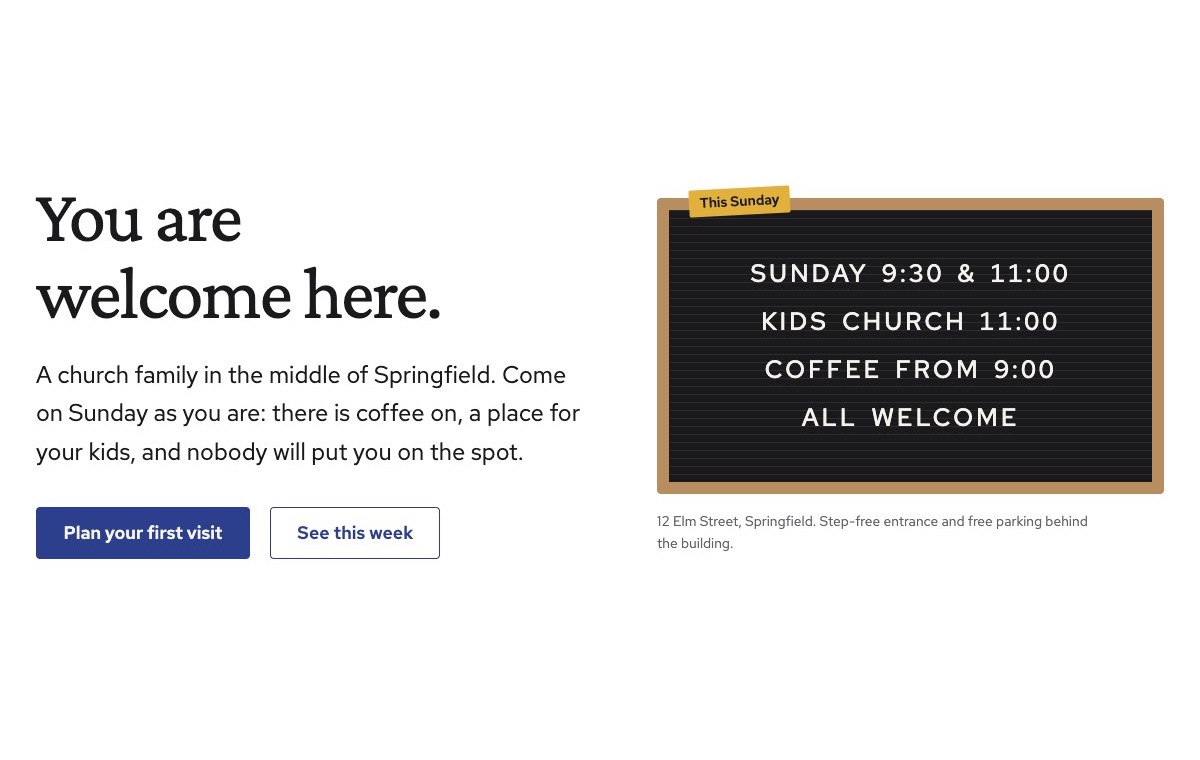
LT Vespera is a block theme for churches and faith communities: Sunday gatherings, groups, children and youth, events and giving. Its look comes from the felt letterboard by the church door: this Sunday’s times in white letters on black felt, with everything else kept warm and plain so a newcomer can plan a first visit. See it live in the demo.
Section patterns (Pro)
| Pattern | Use it for |
|---|---|
| Hero with letterboard | A plain welcome headline with two buttons, next to a felt letterboard showing this Sunday’s times (up to five short rows) and a gold “This Sunday” tab. |
| Plan your visit | What to expect (parking, coffee, children, how long, what to wear) next to a door photo, then the four numbered steps of arriving. |
| This week (timetable) | Gatherings and groups day by day with time, name and place. One-offs get a small gold “this week only” marker. |
| Children and youth | A group for each age with when it meets, a photo, and a safeguarding notice with your safeguarding lead and policy link. |
| Recent talks | Your three newest blog posts, for talk notes or news. |
| Upcoming events | A photo and a list of events with date, title and one line; the next one is marked “this week”. |
| Ways to serve | A choir photo and six teams (welcome, coffee, kids, music, sound, food bank), each with an icon and one line. |
| Giving | A low-pressure note, three ways to give and a “Give online” button for your giving provider. |
| About the church | A photo of the building, your story and four ticked values. |
| Our team | Four portraits with role and a one-line introduction. |
| Stories | A photo beside three short stories from people in the church (use real stories only). |
| Frequently asked questions | Belief, what happens on a Sunday, children, money, accessibility and who to talk to. |
| Times and location | Gathering times, office hours, address, phone and a map with directions. |
| Contact details | Call, email and visit, each under a hairline. |
| Plan a visit call to action | Deep blue band with a visit button and a phone button. |
Page layouts (Pro)
- Home page: the complete homepage.
- Visit page: plan your visit, this week, children and youth, FAQ, times and location and the call to action.
- About page: the church’s story, team, stories, ways to serve, giving and the call to action.
- Contact page: contact details, FAQ, times and location with map and the call to action.
Demo content to replace
- Phone
(555) 017-0115, email[email protected]and the 12 Elm Street address in Springfield (header, footer, hero, contact sections). - The letterboard rows and every gathering time in the top bar, footer, timetable and “Times and location”.
- What to expect and the arrival steps: parking and blue badge spaces, coffee, kids check-in, the quiet room.
- This week’s timetable (marked “Example week”) and the events (marked “Sample dates.”).
- The safeguarding notice: the sample lead “Alex Morgan (sample name)”, the phone number and the policy link.
- Accessibility details in the FAQ (step-free entrance, hearing loop, changing table): keep only what is true.
- The four sample team members, their roles and photos, and the sample stories from “Sample member”.
- The “Give online”, “Tell us you are coming” and policy links (
href="#").
Write only what is true for your church, in your own words for services, leaders and practices; the theme is denomination-neutral until you make it yours. Publish stories only from real people who agreed to it. Do not show children who can be identified in photos without a parent’s written permission: hands, backs and wide shots work well. Name your real safeguarding lead and link your real policy, and do not claim checks or training you have not confirmed.
Photo guide
Replace the illustrations and placeholder portraits with your own photos: select the image in the editor, then Replace. These sizes look sharp on large screens without slowing the site down.
| Image | Shape | Upload size | Tips |
|---|---|---|---|
| Door photo | Landscape 4:3 | 1600 × 1200 px | Your front door or entrance, open and well lit, so newcomers know what to look for. |
| Children’s area photo | Landscape 4:3 | 1600 × 1200 px | A craft table or kids room, with no child who can be identified. |
| Events photo | Landscape 4:3 | 1600 × 1200 px | A gathering seen from behind, or a past event with everyone’s permission. |
| Serving photo | Landscape 4:3 | 1600 × 1200 px | Your choir, band or a team at work, ideally from the side or behind. |
| Stories photo | Landscape 4:3 | 1600 × 1200 px | Coffee and conversation after the gathering. |
| About photo | Landscape 4:3 | 1600 × 1200 px | Your building inside or out, in good light. |
| Team photos | Portrait 4:5 | 800 × 1000 px | Head and shoulders, same background and light for everyone. Ask each person before you publish. |
| Map picture | Landscape 3:2 | 1600 × 1040 px | A screenshot of your map, or keep the illustration; the button links to Google Maps. |
| Blog featured images | Landscape 3:2 | 1600 × 1067 px | Shown on the talk cards and at the top of each post. |
| Logo (header and footer) | Wide or square | At least 200 px tall, PNG with a transparent background or SVG | Shown about 44 px tall. Set it in Appearance → Editor: select the logo block. |
| Site icon | Square | 512 × 512 px | The small icon in browser tabs. Settings → General → Site Icon. |
- Save photos as JPEG or WebP and keep each file under about 300 KB (a free tool such as squoosh.app does this).
- WordPress crops to the shape for you: select the image → Crop in the toolbar to choose which part shows.
- Fill in the Alternative text of each photo (for example “Our reception desk”) for accessibility and Google.
- Only use photos you own or have permission for. Ask clients before you publish photos of them.
Colour styles
Limewash (default: limewash paper, letterboard black, vestment blue and candle gold), Vespers (dark navy for evening), Advent (purple with a rose candle) and Pentecost (deep red with a flame orange). The letterboard stays a black felt board in every style. Try them in the live demo with the colour dots in the top bar.
Giving and visit sign-ups
LT Vespera has no built-in form or payment system. Link the “Give online” button to your giving provider and the “Tell us you are coming” button to your visit form, or add your form plugin’s block to the Contact page. Ask newcomers only for what you need to welcome them: a first name, a contact and how many are coming.