Watch the 2-minute setup
LT Remembra is a block theme for funeral homes and cremation services. It is written for families who have just lost someone and are often reading on a phone: the number answered day and night is always one tap away, and prices are set out plainly. Its look comes from a printed order of service: stone paper, a quiet serif and a folded card for the parts to read first. See it live in the demo.
Section patterns (Pro)
| Pattern | Use it for |
|---|---|
| Hero with call card | A calm headline and short promise next to a call card set like the cover of an order of service: the phone number, “any hour, any day” and a link to the first steps. |
| First steps (folded card) | What to do in the first hours after a death, numbered in the order it happens, with reassurance and the phone number on the left panel. |
| Services list | Traditional funeral, cremation with a service, direct cremation and memorial service, each with a short description and what is included. |
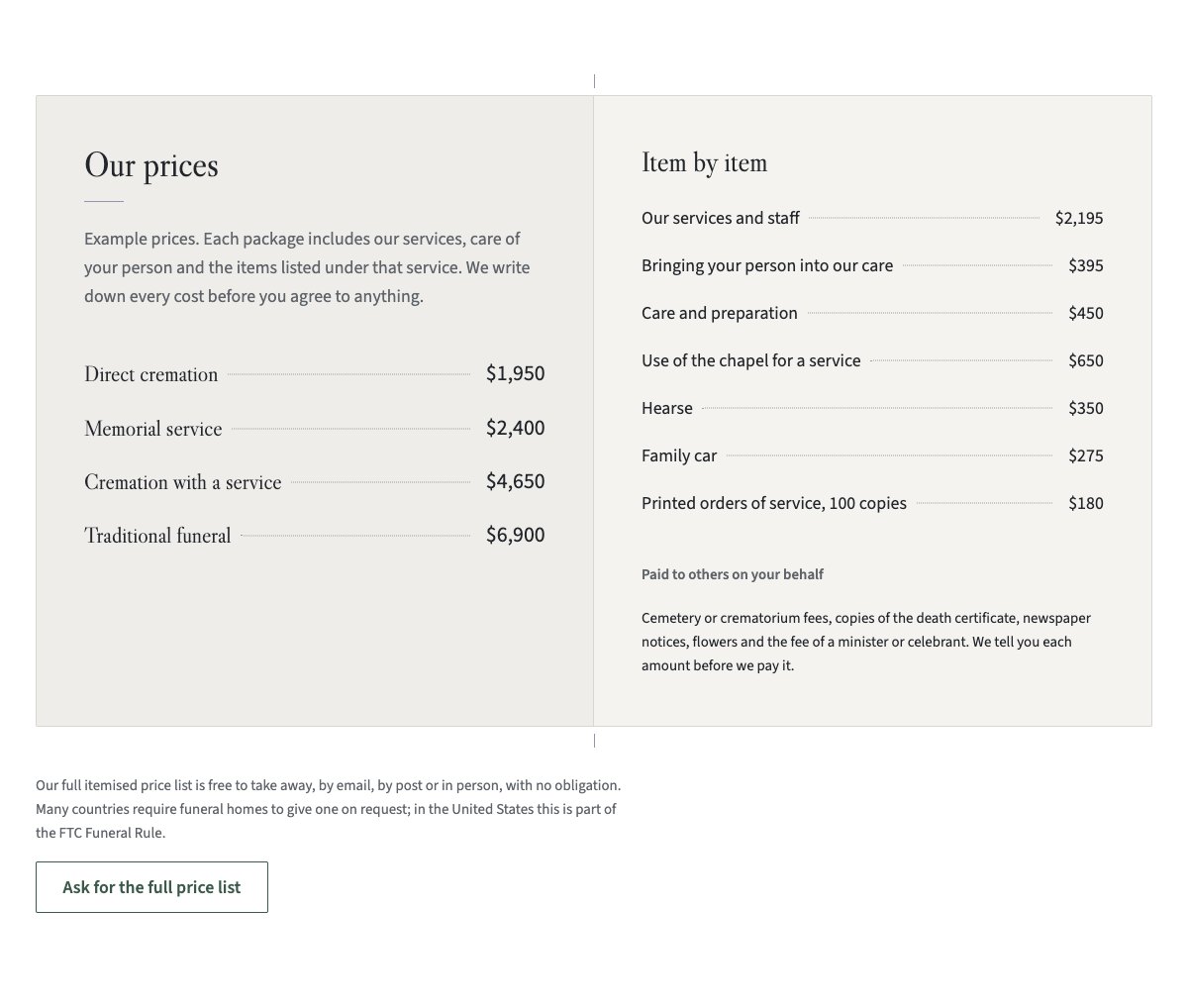
| Prices (folded card) | Example packages on the left panel, itemised prices and the costs paid to others on the right, and a note that the full price list is available on request. |
| Planning ahead | Writing down wishes, a list of what can be decided now and a note that paying in advance is optional. |
| Chapel and premises | Three captioned photos (chapel, family room, garden) and four facilities. |
| About the funeral home | Photo of the building, the story and four things families can expect. |
| Our team | Three people with a photo, role and one line each. |
| Words from families | Three sample quotes under hairlines (use real words only). |
| After the funeral | Help with paperwork, ashes and memorials, and bereavement support. |
| Frequently asked questions | A death at home, the first call, seeing your person, embalming, faith, price lists and payment. |
| Office hours and location | The phone line answered day and night, office hours, address and a map with directions. |
| Contact details | Call, email and visit, each under a hairline. |
| Call us call to action | A quiet moss band with the phone and email buttons. |
| Latest articles | Your three newest blog posts. |
Page layouts (Pro)
- Home page: the complete homepage.
- Services page: services, prices, planning ahead, help after the funeral, FAQ and the call band.
- About page: the story, chapel and premises, team, words from families and the call band.
- Contact page: contact details, office hours with map, FAQ and the call band.
Demo content to replace
- Phone
(555) 017-0114, email[email protected]and the Linden Road address in Springfield (header, footer, hero, first steps, FAQ, contact sections, call band and the 404 page). - Office hours in the top bar, footer and the office hours section, and the parking note.
- The four services and what each includes.
- The example packages and itemised prices, marked “Example prices”, the costs paid to others and the price-list note.
- Facts marked “(sample)”: chapel seats, parking spaces, “since 1968”, the bereavement group, and the payment terms marked “(example terms)”.
- The three sample team members, their introductions and photos, and the sample words from families.
- The first steps and the emergency number (911): check them against practice in your country.
Write only what is true for your funeral home. Do not add licences, years in business or promises you cannot keep, and avoid urgency or sales language. Publish words from families only when they agreed to be quoted, and photos of families or services only with written permission. The price note mentions that many countries require an itemised price list on request (in the United States, the FTC Funeral Rule); check the rules where you work. The theme is faith-neutral: add faith-specific words or symbols only if they fit your funeral home.
Photo guide
Replace the illustrations and placeholder portraits with your own photos: select the image in the editor, then Replace. These sizes look sharp on large screens without slowing the site down.
| Image | Shape | Upload size | Tips |
|---|---|---|---|
| About photo | Landscape 5:4 | 1600 × 1280 px | The front of your building on a calm, clear day. |
| Planning photo | Landscape 5:4 | 1600 × 1280 px | A quiet detail: hands over a table, papers and a pen, or your arrangement room. |
| Premises photos | Landscape 4:3 | 1600 × 1200 px | The chapel empty and lit, the family room, the garden. No coffins in focus. |
| Team photos | Portrait 4:5 | 800 × 1000 px | Head and shoulders, same background and light for everyone. Ask each person before you publish. |
| Map picture | Landscape 3:2 | 1600 × 1040 px | A screenshot of your map, or keep the illustration; the button links to Google Maps. |
| Blog featured images | Landscape 3:2 | 1600 × 1067 px | Shown on the blog cards and at the top of each post. |
| Logo (header and footer) | Wide or square | At least 200 px tall, PNG with a transparent background or SVG | Shown about 44 px tall. Set it in Appearance → Editor: select the logo block. |
| Site icon | Square | 512 × 512 px | The small icon in browser tabs. Settings → General → Site Icon. |
- Save photos as JPEG or WebP and keep each file under about 300 KB (a free tool such as squoosh.app does this).
- WordPress crops to the shape for you: select the image → Crop in the toolbar to choose which part shows.
- Fill in the Alternative text of each photo (for example “Our reception desk”) for accessibility and Google.
- Only use photos you own or have permission for. Ask clients before you publish photos of them.
Colour styles
Stone (default: stone paper, slate ink, deep moss and a touch of heather), Evening (dark slate with pale moss), Linen (warm grey with walnut) and Lake (muted blue). Every style passes WCAG AA contrast. Try them in the live demo with the colour dots in the top bar.
The phone number
Families often find the site on a phone in a difficult moment, so the number is a tap-to-call link in the top bar (kept on phones), the header button, the hero card, the first steps, the FAQ, the call band and the footer. When you change it, change every place listed under “Demo content to replace”, and use the international format in the link, for example tel:+16085550123.