Watch the 2-minute setup
LT Margina is a block theme for independent bookshops: new and second-hand books, author events, a book club and a kids’ corner. Its look comes from the shop floor: a row of spines on a shelf and the handwritten cards booksellers clip beneath the books they love. Book titles are set in italic everywhere, as in print. See it live in the demo.
Section patterns (Pro)
| Pattern | Use it for |
|---|---|
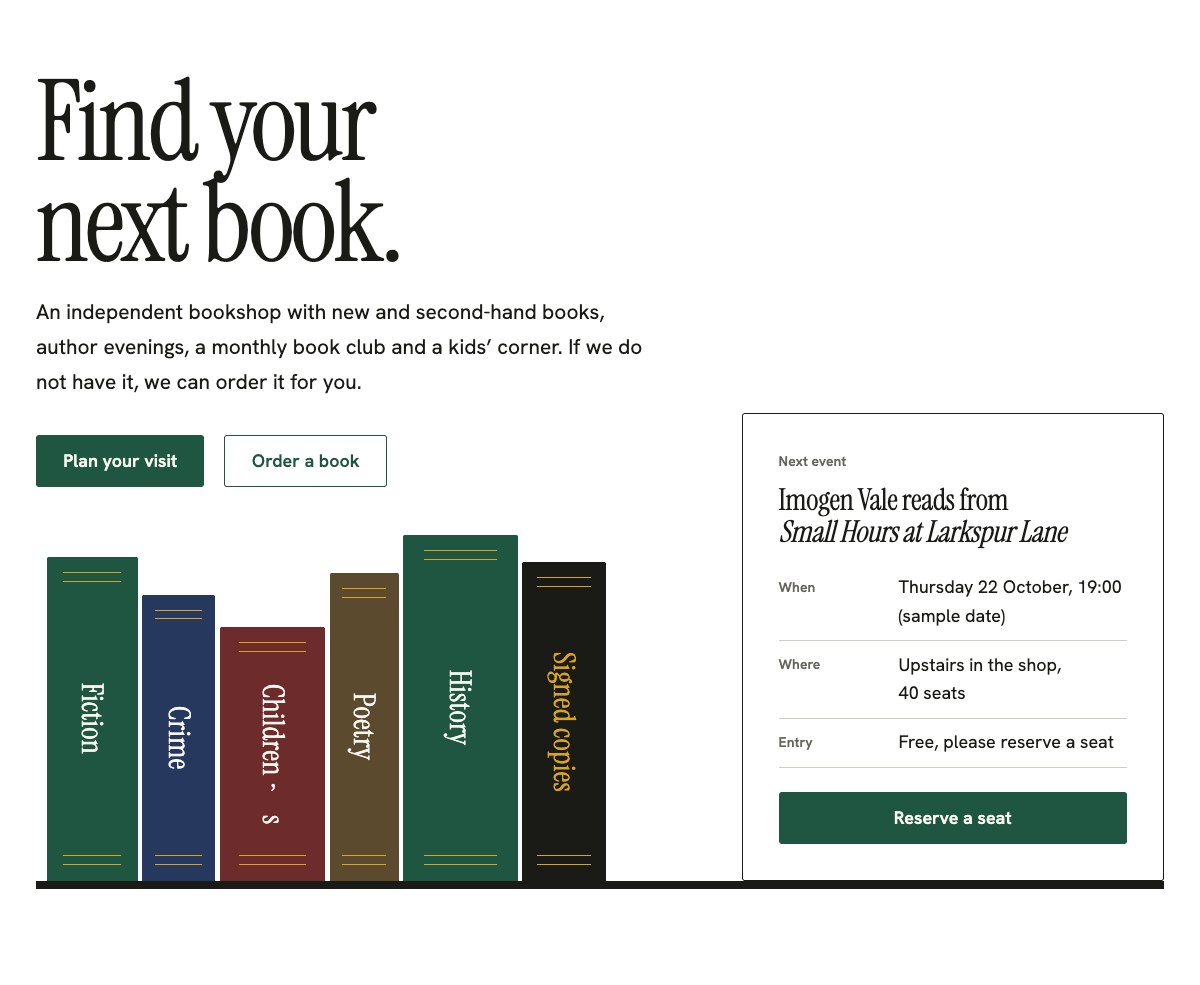
| Hero with a shelf of genres and the next event | A large headline above a row of book spines of different heights. Each spine is a genre and links to a book or section. A card for the next event stands at the end of the shelf. |
| Staff picks (shelf talkers) | Four cards clipped under a shelf edge: a short opinion in the bookseller’s own words, the book, who it suits and who picked it. |
| New arrivals (typographic covers) | Six books as covers set in type on coloured cloth, with genre, format and price, and a round “Signed copy” sticker. |
| Events programme | Readings, signings, story time and book club as a printed programme: date, event and author, free or ticketed, and a reservation link. |
| Book club | This month’s book, when and where the club meets, what it costs and a join button. |
| Kids’ corner | What the children’s corner offers, Saturday story time and help choosing by age. |
| Order any book (three steps) | Ask, we order it, collect, with an order button. |
| Gift cards | A typographic gift card next to the amounts and how to buy one. |
| About the shop | Photo of the shop floor, the shop’s story and a short ticked list. |
| Booksellers | Four portraits with what each one reads and a one-line bio. |
| Reviews from readers | Three sample quotes (use real reviews only). |
| Frequently asked questions | Ordering, second-hand books, event booking, children’s books, gift cards and access. |
| Opening hours and how to find us | Opening hours, address, phone and a map with directions. |
| Contact details | Call, email and visit, each under a hairline. |
| Order a book call to action | Bookcloth green band with an email order button and a phone button. |
| Latest articles | Your three newest blog posts. |
Page layouts (Pro)
- Home page: the complete homepage.
- Events page: the events programme, book club, kids’ corner, ordering a book, FAQ and the call to action.
- About page: the shop’s story, the booksellers, their staff picks, reviews and the call to action.
- Contact page: contact details, opening hours with map, FAQ and the call to action.
Demo content to replace
- Phone
(555) 017-0110, email[email protected]and the Linden Row address in Springfield (header, footer, contact sections), and the bus stop note. - Opening hours in the top bar, footer and the opening hours section.
- Every book title and author marked “(sample)”: they are invented. Put in books you stock, in the staff picks, new arrivals, book club and events.
- The genre spines in the hero: rename them to the sections your shop is known for, and keep one link per spine.
- Prices, formats and the signed copy in the new arrivals, marked as example prices.
- The events, dates and times marked “Sample events and dates” and “(sample date)”, and the next event card.
- Every rule marked “(example)”: delivery time, deposit, book club discount, story time, gift card amounts and validity, second-hand buying days, step-free access.
- The four sample booksellers, their bios and photos, the “Picked by” names, and the sample reviews from “Sample reader” and “Sample parent”.
- The “Order a book”, “Email your order” and “Reserve a seat” buttons: they open an email; link them to your online shop or booking page if you have one.
Use real books only, in your booksellers’ own words. Do not use publishers’ cover images or logos without permission, and do not publish bestseller lists, rankings or “award-winning” claims. Name an author only once their event is confirmed. Publish reviews only from real customers who agreed to it, and do not show children who can be identified in photos without a parent’s written permission: photograph the kids’ corner empty or from behind.
Photo guide
Replace the illustrations and placeholder portraits with your own photos: select the image in the editor, then Replace. These sizes look sharp on large screens without slowing the site down.
| Image | Shape | Upload size | Tips |
|---|---|---|---|
| Shop photo | Landscape 5:4 | 1600 × 1280 px | Your shop floor: shelves, the front table or the counter, with a bookseller at work if they agree. |
| Event photo | Landscape 3:2 | 1600 × 1067 px | An author event from the back of the room, so the audience is seen from behind. |
| Kids’ corner photo | Landscape 4:3 | 1600 × 1200 px | The children’s corner with its low shelves and picture books, without identifiable children. |
| Book club photo | Landscape 4:3 | 1600 × 1200 px | Members around the table with books and tea, with their permission. |
| Bookseller photos | Portrait 4:5 | 800 × 1000 px | Head and shoulders in front of the shelves, same light for everyone. Ask each person before you publish. |
| Map picture | Landscape 3:2 | 1600 × 1040 px | A screenshot of your map, or keep the illustration; the button links to Google Maps. |
| Blog featured images | Landscape 3:2 | 1600 × 1067 px | Shown on the blog cards and at the top of each post. |
| Logo (header and footer) | Wide or square | At least 200 px tall, PNG with a transparent background or SVG | Shown about 44 px tall. Set it in Appearance → Editor: select the logo block. |
| Site icon | Square | 512 × 512 px | The small icon in browser tabs. Settings → General → Site Icon. |
- Save photos as JPEG or WebP and keep each file under about 300 KB (a free tool such as squoosh.app does this).
- WordPress crops to the shape for you: select the image → Crop in the toolbar to choose which part shows.
- Fill in the Alternative text of each photo (for example “Our reception desk”) for accessibility and Google.
- Only use photos you own or have permission for. Ask clients before you publish photos of them.
Colour styles
Shelf (default: cool shelf paper, ink, bookcloth green and mustard gilt), Stacks (a dark night reading room), Paperback (orange and cool grey, after classic paperback covers) and Atlas (map blue with a map-yellow sticker). Each style sets its own cloth colours for the spines and covers. Try them in the live demo with the colour dots in the top bar.
Orders and event seats
LT Margina has no built-in shop or form. The order and reservation buttons open an email to your shop. If you sell online or use an event booking page, link the buttons there, or add your form plugin’s block to the Contact page. Ask only for what you need: the book or event, a name and a phone number or email.