Watch the 2-minute setup
LT Galleri is a block theme for art galleries, artist-run spaces and artists. See it live in the demo.
Section patterns (Pro)
| Pattern | Use it for |
|---|---|
| Hero with current exhibition card | Light hero with headline, buttons and visit points, next to an arched gallery view with a card for the exhibition on now: title, artist, dates, opening night and entry. |
| Current and upcoming exhibitions | Three cards (now showing, next, coming later), each with a picture, the artist and medium, dates and a short text. |
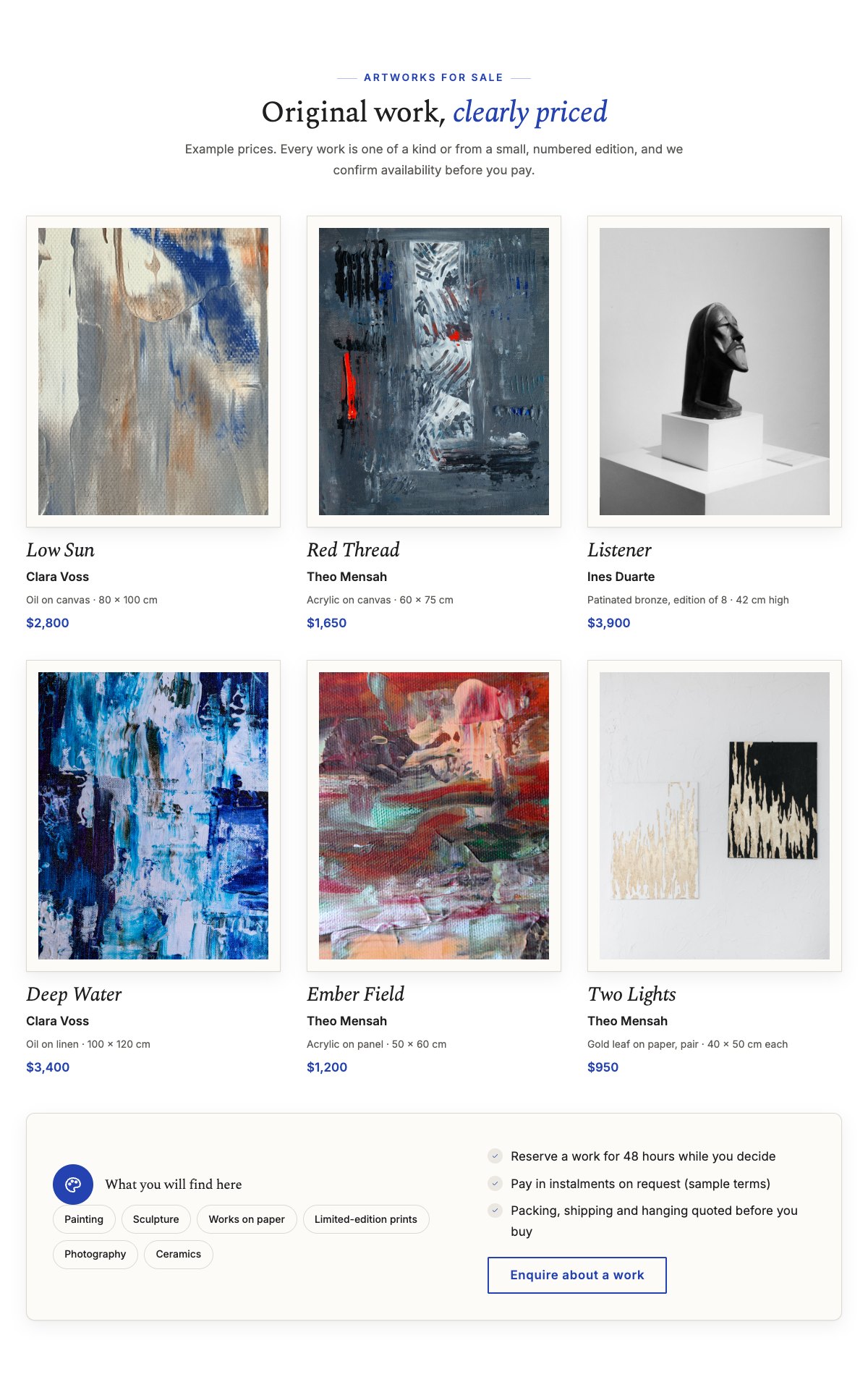
| Artworks for sale | Six framed works with title, artist, medium, size and an example price, then the media you show as chips and your buying notes. |
| Our artists | Three artist cards with arched photos, medium and one line about their work. |
| Inside the gallery | Six portrait photos of your rooms and events, with captions and an Instagram link. |
| About the gallery | Arched studio photo, your story and a checklist of how you work. |
| Private viewings and art advisory | Four cards on a tinted band: private viewings, art advisory, commissions, framing and hanging, with a Book a private viewing button. |
| Buying a work | Four steps: enquire, see it in person, reserve and pay, delivery and hanging. |
| Press quotes | Three quotes on a dark band, each with the publication and the exhibition it is about (use real coverage only). |
| Plan your visit | Entry, getting here, tours and groups, openings and talks, in four framed cards. |
| Frequently asked questions | Buying a work, seeing it first, shipping, commissions, instalments and how artists can submit work. |
| Opening hours and location | Opening hours, address, phone and email next to a map with a directions button. |
| Contact cards | Call the gallery, email us and visit the gallery cards. |
| Invitation list banner | Pale accent strip inviting visitors to join the list for openings, previews and talks. |
| Visit and enquire call to action | Cobalt band with an Enquire about a work button and a phone button. |
Page layouts (Pro)
- Home page: the complete homepage.
- Exhibitions page: exhibitions, artworks for sale, visit info, buying a work, FAQ and the enquire band.
- About page: about the gallery, private viewings and advisory, artists, gallery photos, press and the enquire band.
- Contact page: contact cards, invitation list banner, opening hours with map and FAQ.
Demo content to replace
- Phone
(555) 016-4554, email[email protected]and the 27 Linden Row address (header, footer, contact sections). - Opening hours and every detail marked “(sample)”: free entry, step-free access, Saturday tours and the instalment terms.
- The current exhibition card in the hero and the three sample exhibitions (Quiet Blue, Weight & Air, Paper Rooms) with their dates and texts.
- The sample artists (Clara Voss, Theo Mensah, Ines Duarte), their photos, and the six sample works with media, sizes and example prices.
- The three press quotes marked “Sample publication”, the gallery photos, and the gallery and studio pictures.
- The “Enquire” buttons and “Join the list”: they open an email to [email protected], so link them to your own address, form or shop. “See more on Instagram”: point it to your own profile.
The artists, works, prices and press quotes in the demo are fictional samples. Show only your real artists and works, with photos you have the artist’s permission to publish, and write your real prices or “Price on request”. Use only real press quotes you may reproduce, and do not add awards, sales figures, visitor numbers or “as featured in” lists you cannot show. Do not present art as an investment or promise that a work will rise in value.
Photo guide
Replace the illustrations and placeholder portraits with your own photos: select the image in the editor, then Replace. These sizes look sharp on large screens without slowing the site down.
| Image | Shape | Upload size | Tips |
|---|---|---|---|
| Hero gallery photo | Portrait 4:5, arched top | 1000 × 1250 px | A room of the gallery with work on the walls. Keep the key detail in the upper middle: the arch trims the top corners and the exhibition card covers the bottom left. |
| Studio photo (About) | Landscape 5:4, arched top | 1600 × 1280 px | An artist at work, or the gallery team hanging a show, in natural light. |
| Exhibition pictures (3) | Landscape 3:2 | 1600 × 1067 px | An installation view or a key work from each exhibition, with the artist’s permission. |
| Artworks for sale (6) | Portrait 4:5 | 1000 × 1250 px | Straight-on photos of each work, evenly lit, without reflections. The white mount is added by the theme. |
| Gallery photos (6) | Portrait 4:5 | 1000 × 1250 px | Your rooms, openings and details, with permission from the people shown. |
| Artist photos | Portrait 4:5, arched top | 800 × 1000 px | Head and shoulders with space above the head, ideally in the studio, same light for everyone. |
| Map picture | Landscape 3:2 | 1600 × 1040 px | A screenshot of your street map, or keep the illustration; the button links to Google Maps. |
| Blog featured images | Landscape 3:2 | 1600 × 1067 px | Shown on the blog cards and at the top of each post. |
| Logo (header and footer) | Wide or square | At least 200 px tall, PNG with a transparent background or SVG | Shown about 44 px tall. Set it in Appearance → Editor: select the logo block. |
| Site icon | Square | 512 × 512 px | The small icon in browser tabs. Settings → General → Site Icon. |
- Save photos as JPEG or WebP and keep each file under about 300 KB (a free tool such as squoosh.app does this).
- WordPress crops to the shape for you: select the image → Crop in the toolbar to choose which part shows.
- Fill in the Alternative text of each photo (for example “Our reception desk”) for accessibility and Google.
- Only use photos you own or have permission for. Ask clients before you publish photos of them.
Colour styles
Default (cobalt and off-white), Vermilion, Graphite and Viridian. Try them in the live demo with the colour dots in the top bar.