Watch the 2-minute setup
LT Tinytots is a block theme for nurseries, daycares and preschools. See it live in the demo.
Section patterns (Pro)
| Pattern | Use it for |
|---|---|
| Hero with visit card | Headline, two buttons, a tick line (ages, hours, places) and a “book a visit” card with three visit times. |
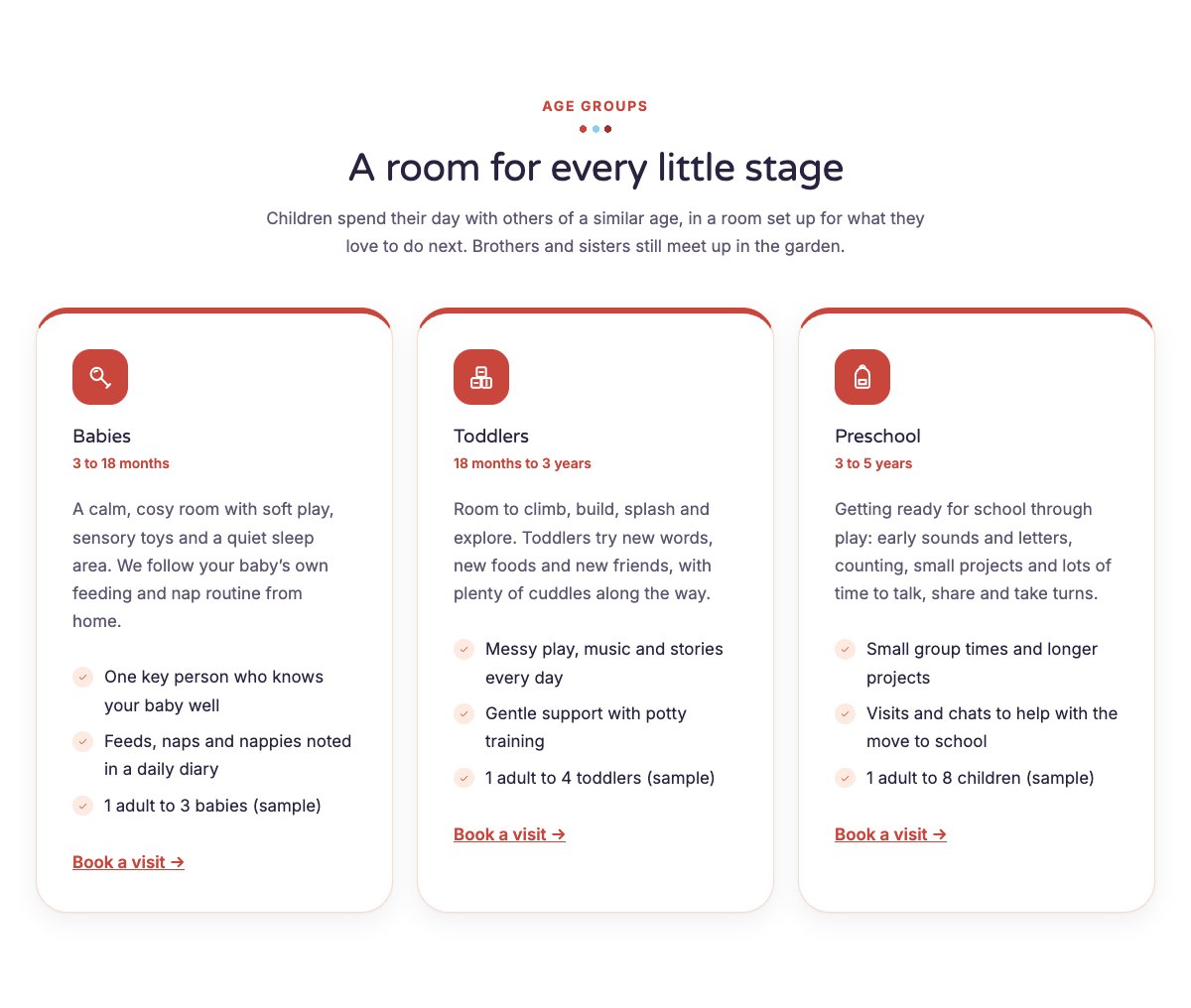
| Age groups | Three room cards for babies, toddlers and preschool with ages, a short text and a checklist with sample ratios. |
| A day at our nursery | Playground picture next to a simple timeline of the day, from breakfast to home time. |
| About the nursery | Playroom picture, your story, a checklist and a note with your licence number and latest inspection result. |
| Learning through play | Six learning areas with icon tiles: talking and stories, early numbers, creative play, music, nature, friends and feelings. |
| Fees and funding | Half day, full day and full week cards with example prices, plus a note about funded hours or subsidies. |
| Meals and snacks | What children eat through the day, an example lunch menu and an allergy note. |
| Our team | Three team cards with photo, role and bio. |
| Gallery | Six picture tiles with captions for your rooms, toys, art corner, reading corner, garden and snack time. |
| Parent reviews | Three review cards (use real reviews only). |
| Frequently asked questions | Ratios, settling in, sickness policy, what to bring, help with fees and daily updates. |
| Opening hours and location | Opening hours, visit days, address, phone and a map with directions. |
| Contact cards | Call, email and find us cards. |
| Safeguarding banner | Highlighted strip with your safeguarding lead and a link to your safeguarding policy. |
| Book a visit call to action | Coloured band with visit and phone buttons. |
| Latest articles | Your three newest blog posts. |
Page layouts (Pro)
- Home page: the complete homepage.
- Programs page: age groups, learning through play, fees and funding, FAQ and the visit band.
- About page: nursery story with licence note, a day at the nursery, team, gallery and parent reviews.
- Contact page: contact cards, safeguarding banner and opening hours with map.
Demo content to replace
- Phone
(555) 016-4862, email[email protected]and the Maple Grove Lane address in Springfield (header, footer, hero, contact sections). - Opening hours, visit days and ages (top bar, hero, footer, hours section) and the three visit times in the hero card.
- Everything marked “(sample)”: licence no. 000000, the inspection rating, the staff-to-child ratios, the funding note and the safeguarding lead.
- The rooms and age ranges, the daily routine, the example lunch menu and the three fee cards with their example prices.
- Team names, roles, bios and photos; the gallery pictures; sample parent reviews.
- The Safeguarding policy, Privacy policy and Accessibility links, and the “Book a visit” buttons: link them to your booking or enquiry form.
Show only your real licence number, your real latest inspection result and the ratios your licence requires; never add ratings, awards, accreditations or statistics you cannot prove. Fees are examples, and the funding note must describe only the schemes you accept. Name your real safeguarding lead and link to your written safeguarding and sickness policies. Do not publish photos, names or stories of children without written permission from their parents: photos of rooms, toys and the garden work well.
Photo guide
Replace the illustrations and placeholder portraits with your own photos: select the image in the editor, then Replace. These sizes look sharp on large screens without slowing the site down.
| Image | Shape | Upload size | Tips |
|---|---|---|---|
| About photo | Landscape 5:4 | 1600 × 1280 px | A bright room at your nursery, tidy and without children’s faces. |
| Daily routine photo | Landscape 5:4 | 1600 × 1280 px | Your garden or playground. |
| Gallery pictures | Landscape 4:3 | 1200 × 900 px | Six photos of rooms, toys, the art corner, reading corner, garden and snack table. |
| Team photos | Portrait 4:5 | 800 × 1000 px | Head and shoulders, same background and light for everyone. |
| Map picture | Landscape 3:2 | 1600 × 1040 px | A screenshot of your map, or keep the illustration; the button links to Google Maps. |
| Blog featured images | Landscape 3:2 | 1600 × 1067 px | Shown on the blog cards and at the top of each post. |
| Logo (header and footer) | Wide or square | At least 200 px tall, PNG with a transparent background or SVG | Shown about 44 px tall. Set it in Appearance → Editor: select the logo block. |
| Site icon | Square | 512 × 512 px | The small icon in browser tabs. Settings → General → Site Icon. |
- Save photos as JPEG or WebP and keep each file under about 300 KB (a free tool such as squoosh.app does this).
- WordPress crops to the shape for you: select the image → Crop in the toolbar to choose which part shows.
- Fill in the Alternative text of each photo (for example “Our reception desk”) for accessibility and Google.
- Only use photos you own or have permission for. Ask clients before you publish photos of them.
Colour styles
Default (warm coral and sky blue), Meadow (leafy green and sunshine yellow), Puddles (sky blue and peach) and Berry (raspberry and mint). Try them in the live demo with the colour dots in the top bar.
Bookings and forms
LT Tinytots has no built-in form. Link the “Book a visit” buttons to your booking or enquiry page, or add a form plugin’s block (WPForms, Fluent Forms, Contact Form 7…) to the Contact page.