Watch the 2-minute setup
LT Venuly is a block theme for wedding venues, event venues, barns, estates and function rooms. See it live in the demo.
Section patterns (Pro)
| Pattern | Use it for |
|---|---|
| Hero with check a date card | Light hero with headline, buttons and highlights, next to an arched photo of the venue with guest numbers, exclusive use, viewings, a sample from-price and a Check your date button. |
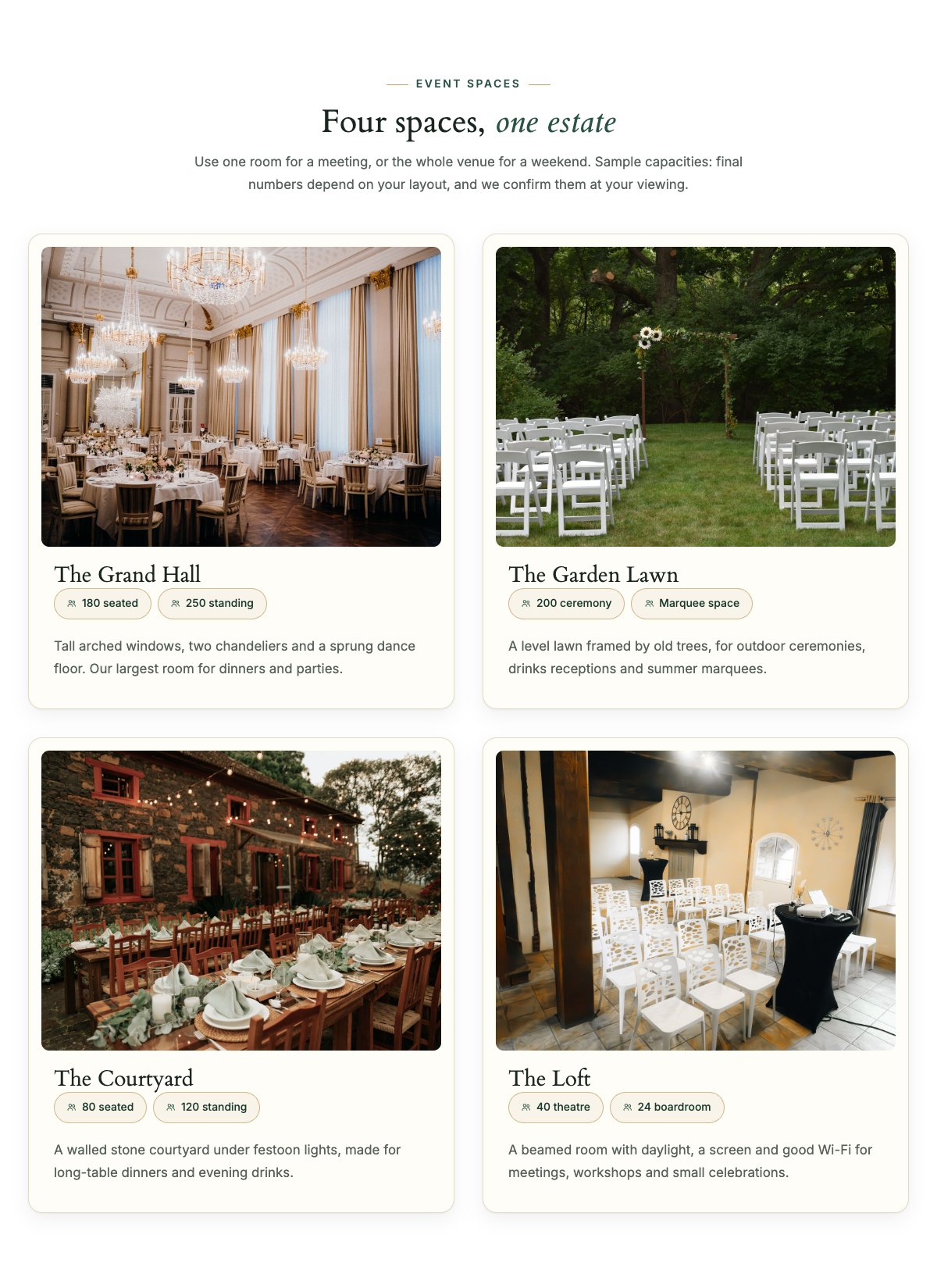
| Event spaces | Four space cards with a photo, capacity chips (seated, standing, ceremony, theatre) and a short description. |
| Weddings, corporate and parties | Three cards on a tinted band, one per type of event, each with an icon, a short text and a checklist. |
| About the venue | Arched ceremony photo, the story of the venue and a checklist of what every booking includes. |
| How booking works | Four steps: check your date, come for a viewing, secure the date with a deposit, plan it together. |
| Packages and hire rates | Venue hire and packages per guest with dotted leaders, the “Every hire includes” chips, deposit, final numbers and payment terms. |
| Catering partners | Your catering approach, an allergy reminder and four partner cards for dinners, cakes, bars and vegetarian menus. |
| Floor plan teaser | A floor plan of the main room next to the layouts you offer and a Request the floor plans button. |
| Venue gallery | Six portrait photos of the venue and past events, with captions and an Instagram link. |
| Our venue team | Venue manager, operations and events coordinator with arched photos and one line each. |
| Reviews | Three review cards from couples, clients and hosts (use real reviews only). |
| Frequently asked questions | Capacity, exclusive use, your own caterer and suppliers, holding a date, finish time, parking and access. |
| Location and parking | Office and viewing hours, address, parking, phone and a map with directions. |
| Contact cards | Call the events team, email and come for a viewing cards. |
| Brochure banner | Brass strip inviting visitors to ask for your brochure with prices, floor plans and sample menus. |
| Book a viewing call to action | Deep green band with a Book a viewing button and a phone button. |
Page layouts (Pro)
- Home page: the complete homepage.
- Spaces page: event spaces, event types, floor plan, catering partners, packages and prices, how booking works, FAQ and the viewing band.
- About page: about the venue, gallery, team and reviews.
- Contact page: contact cards, brochure banner and location with parking and map.
Demo content to replace
- Phone
(555) 016-4532, email[email protected]and the Orchard Hill Road address (header, footer, contact sections). - Office hours and viewing times (top bar, footer, location section) and the finish time in the FAQ.
- The four sample spaces and their capacities, the “Check a date” card with “Weddings from $4,500 (sample price)”, and the capacity answer in the FAQ.
- The example prices, what every hire includes, the deposit and payment terms; the four catering partners marked “(sample)”; parking (“Around 60 spaces”).
- Team names, roles and photos; the six gallery photos; the floor plan picture; sample reviews.
- The “Book a viewing” and “Check your date” buttons: link them to your enquiry form. “Request the brochure” and “See more on Instagram”: point them to your own brochure and profile.
Capacities and prices in the demo are samples: real maximum numbers depend on your layout, fire safety assessment and licence, so confirm them before you publish and keep the note that they are confirmed at the viewing. Do not add awards, “best venue” titles, ratings or statistics you cannot show, and list only caterers and suppliers who agreed to appear.
Photo guide
Replace the illustrations and placeholder portraits with your own photos: select the image in the editor, then Replace. These sizes look sharp on large screens without slowing the site down.
| Image | Shape | Upload size | Tips |
|---|---|---|---|
| Hero venue photo | Portrait 4:5, arched top | 1000 × 1250 px | Your main hall or the front of the venue, shot straight on. Keep the key detail in the upper middle: the arch trims the top corners and the check a date card covers the bottom left. |
| Ceremony photo (About) | Landscape 5:4, arched top | 1600 × 1280 px | Your ceremony spot set with chairs, or the garden in good light. |
| Event space photos (4) | Landscape 4:3 | 1600 × 1200 px | Each space set for an event, from the same height and angle, with daylight or warm evening light. |
| Floor plan | Landscape 20:13 | 1600 × 1040 px | A clean, simple drawing of your main room; keep the text large enough to read on a phone. |
| Team photos | Portrait 4:5, arched top | 800 × 1000 px | Head and shoulders with space above the head, same light for everyone. |
| Gallery (6 photos) | Portrait 4:5 | 1000 × 1250 px | Ceremonies, tables, lights and the spaces, used with the permission of the photographer and the people shown. |
| Map picture | Landscape 3:2 | 1600 × 1040 px | A screenshot of your map, or keep the illustration; the button links to Google Maps. |
| Blog featured images | Landscape 3:2 | 1600 × 1067 px | Shown on the blog cards and at the top of each post. |
| Logo (header and footer) | Wide or square | At least 200 px tall, PNG with a transparent background or SVG | Shown about 44 px tall. Set it in Appearance → Editor: select the logo block. |
| Site icon | Square | 512 × 512 px | The small icon in browser tabs. Settings → General → Site Icon. |
- Save photos as JPEG or WebP and keep each file under about 300 KB (a free tool such as squoosh.app does this).
- WordPress crops to the shape for you: select the image → Crop in the toolbar to choose which part shows.
- Fill in the Alternative text of each photo (for example “Our reception desk”) for accessibility and Google.
- Only use photos you own or have permission for. Ask clients before you publish photos of them.
Colour styles
Default (deep green, ivory and brass), Ballroom, Orangery and Vineyard. Try them in the live demo with the colour dots in the top bar.