Watch the 2-minute setup
LT Staybrook is a block theme for boutique hotels, inns, bed and breakfasts and guesthouses. See it live in the demo.
Section patterns (Pro)
| Pattern | Use it for |
|---|---|
| Hero with availability card | Light hero with headline, buttons and highlights, next to an arched photo of the house with check-in and check-out times, a from-price and a Check availability button. |
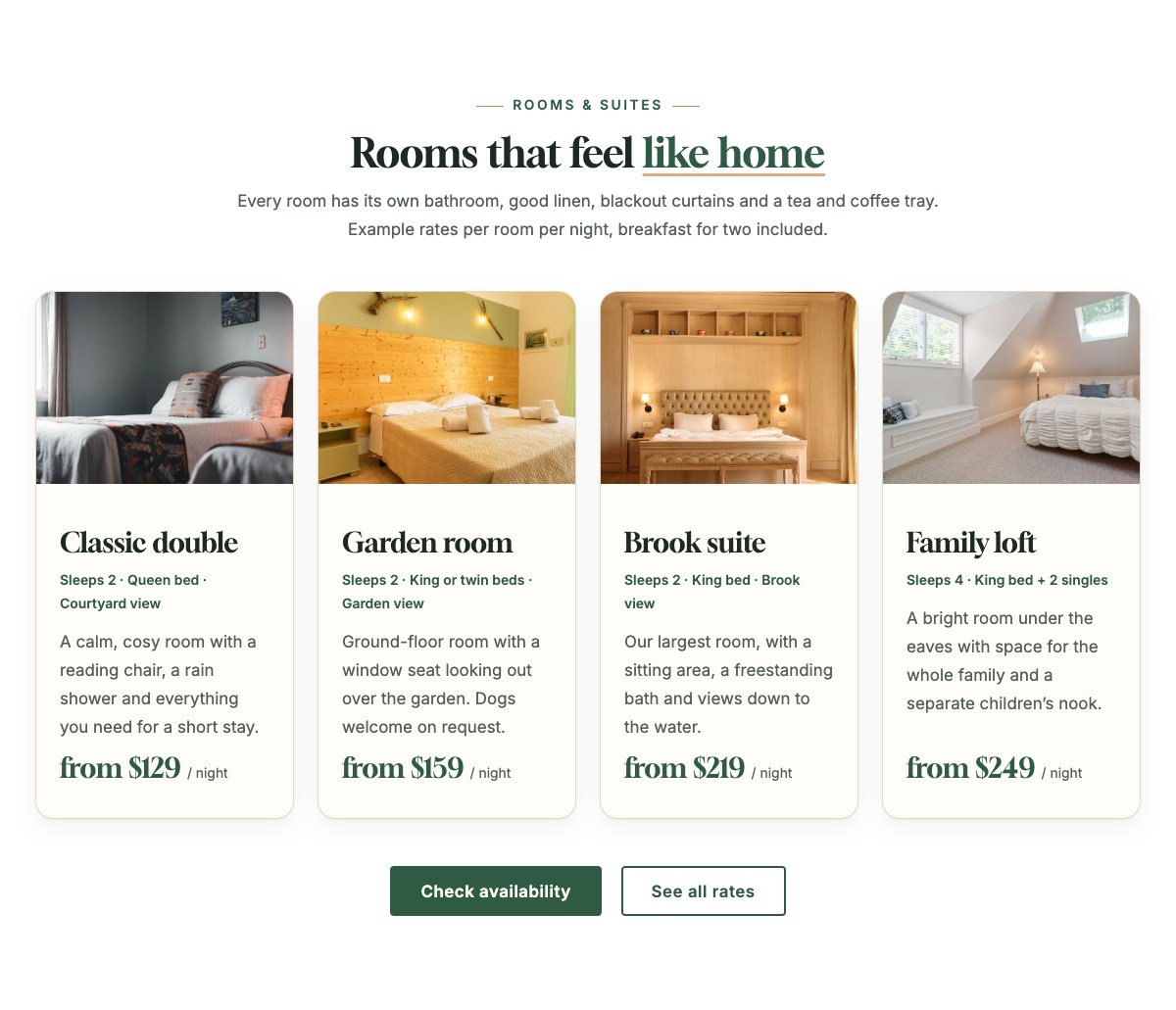
| Rooms and suites | Four room cards with a photo, sleeps, beds and view, a short description and a from-price per night. |
| Amenities | Eight cards with icons: breakfast, Wi-Fi, parking, garden, dog-friendly rooms, bathrooms, late arrivals and bikes. |
| Our story | Arched lounge photo, the story of the house and a checklist of what guests can count on. |
| Breakfast and dining | Serving times, breakfast favourites as chips and an allergy note, next to an arched breakfast photo. |
| Room rates | Weekday and weekend rate cards with dotted leaders, what every rate includes, check-in times, cancellation and payment terms. |
| Offers and packages | Three framed offer cards, for example a midweek escape or a weekend with your dog. |
| Local area guide | Four places nearby with an icon, a walking-time tag and a short tip. |
| Gallery | Six portrait photos of the house, rooms, garden and surroundings, with captions and an Instagram link. |
| Your hosts | Owner, breakfast cook and front desk with arched photos and one line each. |
| Guest reviews | Three review cards (use real reviews only). |
| Frequently asked questions | Check-in and check-out, late arrival, parking, dogs, cancellations, allergies and children. |
| Location and how to get here | Front desk hours, check-in times, directions by car and by train, address, phone and a map with directions. |
| Contact cards | Call the front desk, email and find us cards. |
| Gift voucher banner | Copper strip promoting gift vouchers for a stay. |
| Book direct call to action | Green band with a Check availability button for your booking engine and a phone button. |
Page layouts (Pro)
- Home page: the complete homepage.
- Rooms page: rooms and suites, amenities, room rates, offers, FAQ and the book direct band.
- About page: our story, breakfast, local area guide, gallery, hosts and reviews.
- Contact page: contact cards, gift voucher banner and location with directions and map.
Demo content to replace
- Phone
(555) 016-4466, email[email protected]and the Brookside Lane address (header, footer, contact sections). - Front desk hours and check-in and check-out times (top bar, hero card, footer, rates, FAQ and location section).
- The four sample rooms with beds, views and from-prices; the example rates, extras and terms; the “Rooms from $129 a night (sample rate)” line in the hero card.
- The amenities you really offer, breakfast times and dishes, the three sample offers, the four places in the area guide and their walking times.
- Host names, roles and photos; the six gallery photos; sample guest reviews; the directions by car and by train.
- The “Check availability”, “Choose your dates” and “Book now” buttons: link them to your booking engine. “Follow us on Instagram”: point it to your own profile.
Rates in the demo are samples: keep the note that your booking page shows the live price, and do not promise a “best rate” you cannot guarantee. Do not add star ratings, awards, review scores or certificates your property does not have, and keep the allergy note for breakfast.
Photo guide
Replace the illustrations and placeholder portraits with your own photos: select the image in the editor, then Replace. These sizes look sharp on large screens without slowing the site down.
| Image | Shape | Upload size | Tips |
|---|---|---|---|
| Hero house photo | Portrait 4:5, arched top | 1000 × 1250 px | The front of your house or the entrance, shot straight on. Keep the door in the upper middle: the arch trims the top corners and the availability card covers the bottom left. |
| Lounge photo (Our story) | Landscape 5:4, arched top | 1600 × 1280 px | Your lounge, a fireplace corner or the hallway, in warm daylight. |
| Breakfast photo | Portrait 4:5, arched top | 1000 × 1250 px | A laid breakfast table or a plate and coffee, with the food in the lower middle. |
| Room photos (4) | Landscape 4:3 | 1600 × 1200 px | Each room from the doorway, bed made, curtains open. Same light and angle for every room. |
| Host photos | Portrait 4:5, arched top | 800 × 1000 px | Head and shoulders with space above the head, same light for everyone. |
| Gallery (6 photos) | Portrait 4:5 | 1000 × 1250 px | Your door, garden, a room detail, the lounge, breakfast and the view nearby. |
| Map picture | Landscape 3:2 | 1600 × 1040 px | A screenshot of your map, or keep the illustration; the button links to Google Maps. |
| Blog featured images | Landscape 3:2 | 1600 × 1067 px | Shown on the blog cards and at the top of each post. |
| Logo (header and footer) | Wide or square | At least 200 px tall, PNG with a transparent background or SVG | Shown about 44 px tall. Set it in Appearance → Editor: select the logo block. |
| Site icon | Square | 512 × 512 px | The small icon in browser tabs. Settings → General → Site Icon. |
- Save photos as JPEG or WebP and keep each file under about 300 KB (a free tool such as squoosh.app does this).
- WordPress crops to the shape for you: select the image → Crop in the toolbar to choose which part shows.
- Fill in the Alternative text of each photo (for example “Our reception desk”) for accessibility and Google.
- Only use photos you own or have permission for. Ask clients before you publish photos of them.
Colour styles
Default (forest green and copper), Moorland, Harbour and Hearth. Try them in the live demo with the colour dots in the top bar.